You just published a stellar 45-minute podcast episode. Your guest delivered insights that could genuinely help your audience. You’re proud of it. But here’s the problem: that single piece of content will reach maybe 2,000 people if you’re lucky. Meanwhile, your potential audience scatters across YouTube, LinkedIn, Instagram, TikTok, email newsletters, and blog readers who prefer text.
What if that one podcast could become 30 pieces of content—each optimized for different platforms and audience preferences—without you spending another 40 hours on edits and reformats? That’s exactly what content repurposing tools do.
This guide cuts through the noise. I’ve researched over 100 tools, verified current pricing from official sources, and tested the claims against real creator workflows. Whether you’re a solo creator on a budget, running a small team, or managing content for an agency, you’ll find exactly which tools solve your specific repurposing challenges—and which ones are just expensive distractions.
What Content Repurposing Actually Means (And Why Most Tools Get It Wrong)
Resizing a video is not repurposing. Slapping automated captions on a clip is not repurposing. Converting a blog post to a tweet thread by breaking paragraphs into 280-character chunks is not repurposing.
Real repurposing means transforming content to match both the format and the context of a different platform. It recognizes that your LinkedIn audience wants actionable frameworks while your TikTok audience wants entertainment-first hooks. It understands that a podcast listener absorbing content during their commute needs different pacing than a blog reader at their desk.
The distinction matters because the creator economy is now worth $205 billion and growing at 23.3% annually. With that much competition for attention, content that merely reformats gets ignored while content that truly adapts to platform expectations wins.
What Changed in Content Repurposing Technology
AI moved from experimental to essential. According to Archive’s creator economy statistics, 84% of creators now use AI tools daily—and top-earning creators use them twice as often as average creators.
Three specific breakthroughs reshaped what’s possible:
Multimodal AI became production-ready. Tools can now seamlessly move between text, audio, video, and images because foundation models like GPT-5 and Meta’s Llama 4 process all these formats simultaneously. This means you can feed in a video and get back a blog post that actually captures visual context, or turn text into video with AI presenters that look genuinely human.
Voice cloning hit professional quality. Platforms like ElevenLabs now support 74+ languages with voice clones generated from just 10 seconds of sample audio. Platforms now achieve 85-95% similarity scores—meaning your voice clone is indistinguishable from your real voice to most listeners.
The market consolidated dramatically. The creator economy saw 81 M&A deals in 2025, up 17.4% year-over-year. Major acquisitions included Bending Spoons buying Vimeo for $1.38 billion. The “AI wrapper” startups—tools that just put a simple interface on top of ChatGPT—mostly disappeared. The survivors built real technology moats.
What does this mean for you? Features that cost $99/month two years ago are now included in $15/month plans or even free tiers. Basic transcription, auto-captioning, and simple video trimming are now table stakes. The premium features worth paying for are AI highlight detection with virality scoring, voice cloning, multi-language dubbing, AI avatar generation, and workflow automation through APIs.
Video Clipping Tools That Turn Long-Form Into Scroll-Stoppers
This is where most creators start their repurposing work, and for good reason. If you’re producing podcasts, webinars, YouTube videos, or recorded presentations, you’re sitting on a goldmine of short-form content. The challenge is that manually finding the best 60-second moments in a 45-minute video is mind-numbing work.
OpusClip
Best for: Creators and agencies who need AI virality scoring and professional-grade editing features
Pricing: Free tier (60 credits/month, watermarked) | Starter $15/month | Pro $29/month or $14.50/month annually
Official site: opus.pro
OpusClip dominates this category with over 10 million users and a recent $20 million investment from SoftBank that values the company at $215 million.
The ClipAnything model analyzes spoken words, visual objects, sound patterns, and emotional tone to identify clip-worthy moments. Each potential clip gets a “Virality Score” predicting its engagement potential based on hook strength, flow, and trend alignment.
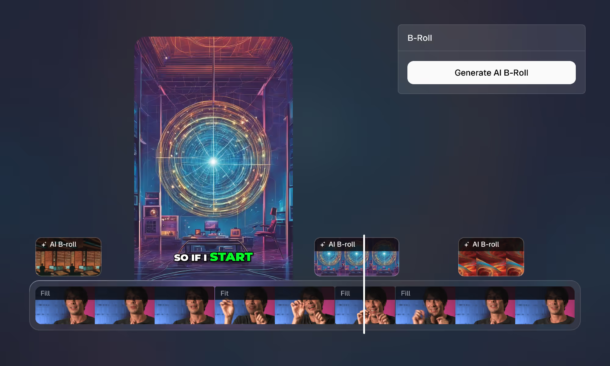
When you upload a video, OpusClip identifies 10-15 potential clips, ranks them by virality score, automatically adds animated captions (in 20+ languages), generates AI B-roll footage for visual variety, and creates custom thumbnails. You can publish directly to YouTube Shorts, TikTok, Instagram Reels, LinkedIn, and Facebook without leaving the platform.
The Pro plan includes brand template customization, social media scheduling, team workspaces, and XML export for Premiere Pro and DaVinci Resolve. The Agent Opus feature acts like a personal video editor—you can tell it “make this clip more punchy” or “remove the rambling part” in natural language.
The main limitation: free plan clips expire after 3 days and carry watermarks. For occasional use, this works. For consistent content production, you need paid tiers.
Real-world performance from BigVu’s review shows creators reduced editing time from 6 hours per week to 45 minutes while actually increasing content output by 300%.
Vizard.ai
Best for: Budget-conscious creators and teams needing collaboration features
Pricing: Free (60 min/month, 720p) | Pro plans start around $16/month
Languages: 100+ languages for dynamic captioning
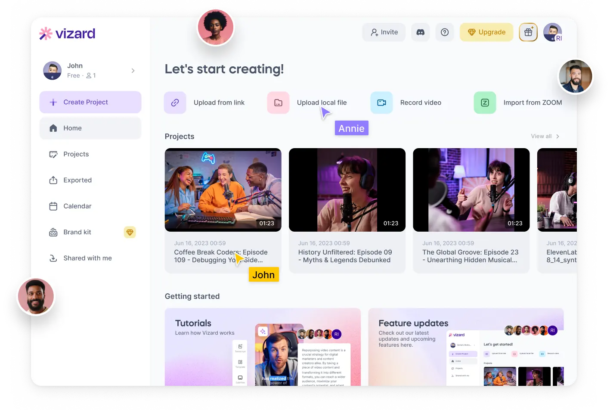
Vizard.ai offers compelling value while delivering comparable AI clipping quality to OpusClip. The Team plan is particularly strong for agencies—it includes shared workspaces, brand kits (logos, fonts, colors enforced across all clips), and connections to 20 social media accounts.
According to Vizard’s comparison research, their AI processes over 30 content types including podcasts, webinars, talking-head videos, product demos, and customer testimonials. The platform automatically generates clips, adds AI emoji reactions, inserts B-roll footage, and creates social media descriptions.
The free tier is genuinely useful with 60 minutes of upload per month and 720p exports. That’s enough for weekly content creation if you’re strategic about it.
One differentiator worth noting: Vizard supports 100+ languages for captions including Arabic, Hebrew, Korean, Japanese, and most European languages. If you’re targeting international audiences, this matters more than flashier features.
Descript
Best for: Podcasters and video creators who value editing flexibility
Pricing: Free (1 hour media/month) | Paid plans use media-minutes and AI-credits model
Official site: descript.com
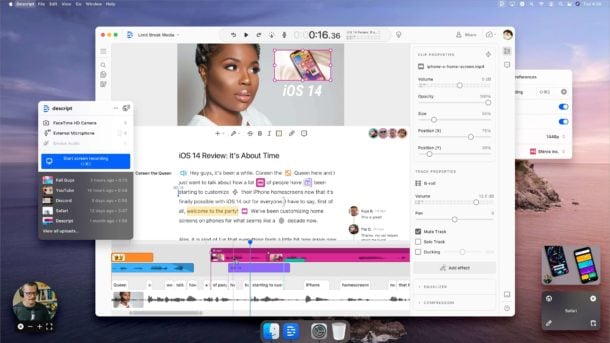
Descript pioneered something genuinely revolutionary: editing video by editing text. Upload a video, get an automatic transcript, delete words from the transcript, and the video automatically cuts those words out. It sounds simple, but it fundamentally changes the editing experience from technical to editorial.
Paid plans include varying amounts of monthly media storage and AI credits for features like:
- Overdub (voice cloning from sample audio)
- Eye contact correction (makes you appear to look at the camera)
- Green screen removal
- Automatic multicam editing
- Filler word removal (“um,” “uh,” “like” automatically deleted)
- Studio Sound (audio enhancement that makes recordings sound professionally treated)
The voice cloning deserves special attention. After training Overdub with your voice, you can type text and generate audio that sounds like you said it. This isn’t for creating fake content—it’s for fixing mistakes. Said “February” when you meant “January”? Type the correction and Overdub generates the fix in your voice. According to independent creator Cristi Cotovan’s analysis, this feature alone saves him 2-3 hours per week.
The workflow integration is excellent. Descript connects with Dropbox, Google Drive, Zapier, YouTube, and major podcast hosts. The Publish feature pushes directly to Transistor, Captivate, Simplecast, and Audioboom without manual file transfers.
One limitation to note: the free plan (1 hour of media) includes watermarked exports. For testing workflows, it’s sufficient. For actual publishing, you need paid tiers.
Podcast Repurposing Platforms That Transform Audio Into Multiple Formats
If you’re producing podcast content, you’re creating what I call “content dark matter”—incredibly valuable material that most people can’t access because they don’t consume audio content. Only about 23% of Americans listen to podcasts weekly. That means roughly 77% of your potential audience will never hear your best work.
Castmagic
Best for: Podcasters, agencies, and coaches who want maximum content leverage
Pricing: Hobby $21/month annually | Starter $79/month annually
Output: 100+ content assets from a single recording
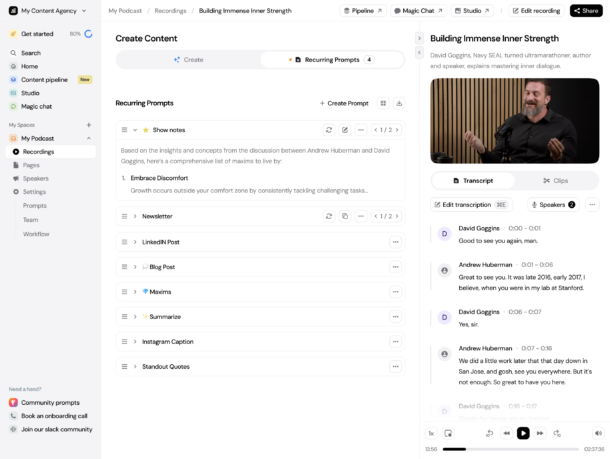
Castmagic generates what they call “100+ content assets” from a single podcast episode:
- Full transcript with timestamps
- Show notes (short, medium, and long versions)
- Blog post (1,000-2,000 words, SEO-optimized)
- Social media posts (platform-specific for LinkedIn, X, Instagram, Facebook, TikTok)
- Email newsletter (complete with subject lines and preview text)
- Quote graphics (5-10 pull quotes formatted for social)
- Key topics and themes summary
- Guest bio and introduction
- Video clips with captions
- Audiogram snippets
- Email sequences (3-5 emails nurturing the topic)
- Video scripts for follow-up content
According to ContentCreators.com’s research, Castmagic runs on GPT-4 Turbo, which means the output quality is significantly higher than earlier AI writing tools.
The Magic Chat feature lets you ask questions about your own content: “What were the three main frameworks discussed?” or “Pull out every specific statistic mentioned” or “Create a LinkedIn post highlighting the controversy in minute 23.” The AI references your transcript to generate accurate, contextual responses.
Custom Magic Templates automate output generation based on your specific needs. For instance, you could create a template that always generates a LinkedIn post with a contrarian hook, a 5-email nurture sequence, and 10 tweet-sized insights—all formatted to your brand voice.
Pricing starts at $21/month annually for the Hobby plan with basic features. The Starter plan at $79/month annually includes team seats and expanded capabilities.
Podsqueeze
Best for: Individual podcasters watching their budget
Pricing: Free tier available | Starter $5.99/month annually or $8.99/month
Official site: podsqueeze.com
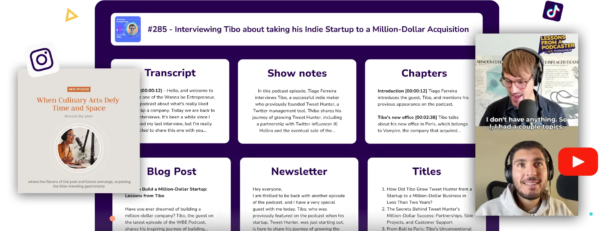
Podsqueeze offers the best value-to-feature ratio in podcast repurposing. At just $5.99/month annually, you get:
- Show notes generation (multiple format styles)
- Blog post creation (800-1,500 words)
- Newsletter drafts
- Social media posts (platform-optimized)
- Podcast clips with animated subtitles
- Audiograms (audio waveform videos)
- Quote images for Instagram/LinkedIn
According to Singify’s review, the platform provides enough capacity for weekly podcast repurposing if episodes run 30-40 minutes.
One feature that sets Podsqueeze apart: minutes roll over up to 3x your monthly allocation. Most competitors enforce use-it-or-lose-it policies. If you have an inconsistent publishing schedule or take occasional breaks, this flexibility matters.
The output quality is good but not exceptional. Blog posts read like expanded transcripts rather than genuinely written articles. Social posts sometimes miss the platform-specific tone adjustments that make content perform well. For the price, though, it’s an excellent starting point.
Riverside
Best for: Podcasters and interviewers who want recording and clipping in one platform
Pricing: Free (2 hours multi-track) | Pro $24/month annually | Live $34/month annually
Recording quality: 4K video, 48kHz audio, separate tracks per participant
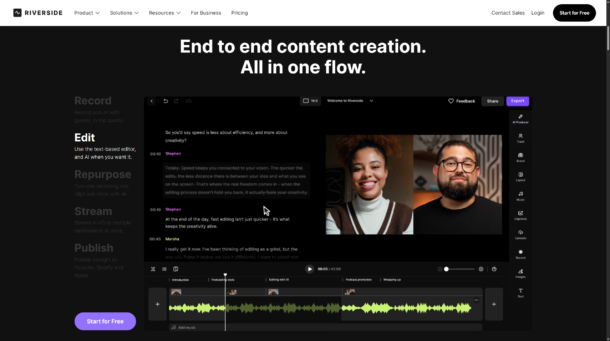
Riverside solves a different problem than the other tools here. While Castmagic and Podsqueeze focus on post-production repurposing, Riverside combines recording and repurposing in a single workflow.
The platform’s signature feature is local recording technology. Unlike Zoom or Google Meet where quality depends on each participant’s internet connection, Riverside records separate 4K video and 48kHz audio tracks locally on each participant’s device. The internet only transmits low-resolution previews during recording. After the session, high-quality files upload in the background.
The result, studio-quality recordings even when participants have mediocre internet connections. This matters enormously for podcast audio quality and video clip usability.
Magic Clips is Riverside’s AI clipping engine. It automatically identifies highlights, generates short clips, adds captions, and formats for different platforms. The quality sits between OpusClip and Vizard—solid but not category-leading.
Pro plan ($24/month annually) includes unlimited recordings and AI editing. Live plan ($34/month annually) adds streaming to 8 platforms simultaneously. Webinar plan ($79/month) includes registration and lead capture.
The free plan includes 2 hours of multi-track recording and unlimited single-track recording—making it viable for occasional podcast recordings without any cost.
If you’re starting a podcast from scratch or currently using separate tools for recording and repurposing, Riverside consolidates both into one platform. If you already have reliable recording infrastructure, dedicated clipping tools offer more features for similar pricing.
Text-to-Video and AI Avatar Platforms
This category represents one of the most dramatic shifts in content creation. Two years ago, creating presenter-style video content required cameras, lighting, microphones, editing software, and either comfort on camera or hiring talent. Today, you can type a script and generate a photorealistic AI presenter speaking your words in 175+ languages.
The technology still feels slightly uncanny, but it’s crossed the threshold into “good enough for most use cases.” Corporate training, educational content, social media explainers, and product demonstrations are all viable applications.
Synthesia
Best for: Corporate training, educational content, enterprise teams
Pricing: Free (3 min/month, watermarked) | Starter $18/month annually | Creator $64/month annually
Languages: 160+ voices, 130+ dubbing languages
Compliance: SOC 2 Type II, ISO 42001, GDPR
Official site: synthesia.io
Synthesia offers plans starting from $18/month. The platform offers 240+ stock AI avatars with the latest Express-2 generation showing dramatically improved realism compared to earlier versions.
The improvements include natural micro-expressions, better lip sync accuracy, and more natural hand gestures when avatars are in seated positions.
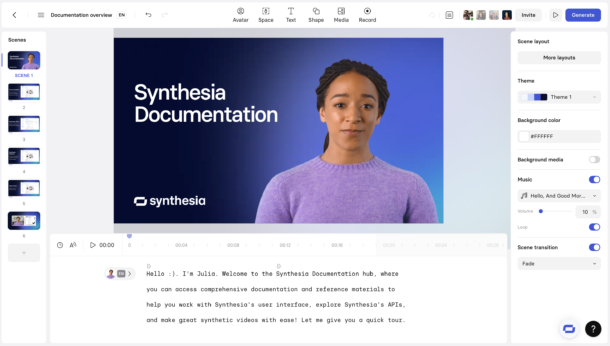
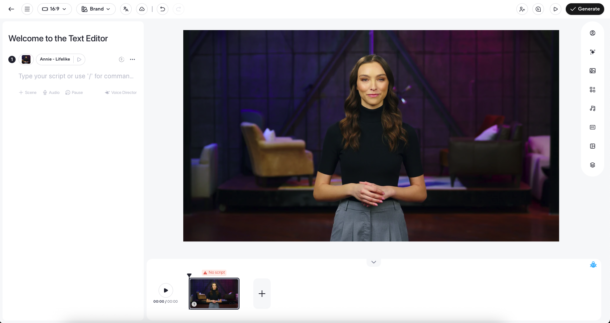
Creating a video works like this: you write or paste a script, select an avatar, choose a voice (or clone your own), pick a template, and generate. Export time depends on length—a 2-minute video typically renders in 3-5 minutes. You can add images, videos, screen recordings, and text overlays through a simple editor.
Personal avatars (digital twins of yourself) are included in annual Starter/Creator plans or available as a $1,000/year add-on. You record a 5-minute video following their prompts, submit it for processing, and receive your avatar within 48 hours. Your AI twin can then speak any script you provide—in any supported language, including languages you don’t actually speak.
The 1-click translation feature is genuinely impressive. Create a video in English, click translate, select 10 languages, and Synthesia generates 10 versions with lip-sync matched to each language. For global companies creating training content, this single feature justifies the entire platform cost.
Enterprise features include Video Agents—interactive AI presentations where viewers can ask questions and the avatar responds with generated answers. This transforms static training videos into conversational experiences. Full SSO, SCIM provisioning, and dedicated account management are included.
Limitations worth noting: the free plan (3 minutes/month) is sufficient for testing but not regular use. Watermarks appear on all free exports. Video quality tops out at 1080p—no 4K option currently. While avatars have improved dramatically, they still occasionally produce uncanny valley moments with complex hand gestures or rapid head movements.
HeyGen
Best for: Social video marketing, content creators, agencies
Pricing: Free (3 videos/month, watermarked) | Creator $24/month annually | Business $149/month
Languages: 175+ languages and dialects
Official site: heygen.com
HeyGen positions itself more toward marketing and social content than enterprise training. The Creator plan ($24/month annually) includes unlimited videos up to 30 minutes, 700+ stock avatars, voice cloning, and the key differentiator: motion and gesture control.
The Avatar IV technology supports natural movements including nodding, head tilts, pointing, and even product placement gestures. This makes avatars feel more dynamic and engaging than competitors’ seated, talking-head style presentations.
The platform’s strength shows in social media use cases. Templates are designed for Instagram Reels, YouTube Shorts, TikTok, and LinkedIn—with aspect ratios, pacing, and visual styles optimized for each platform. Voice cloning captures emotional tonality better than Synthesia.
The Business plan ($149/month) adds 5 custom video avatars (digital twins of yourself or team members), interactive video features where viewers can click buttons triggering different response paths, and native integrations with HubSpot, Zapier, Make, and n8n for workflow automation.
One particularly clever feature is URL-to-video. Paste a blog post or article URL, and HeyGen automatically generates a script summary, selects relevant images, creates a presenter video, and adds captions. The output quality varies—simple explainer articles work well, complex technical content often needs script editing—but it’s an impressive automation nonetheless.
Major limitation: the free plan (3 videos/month) restricts videos to 1 minute and applies watermarks. For serious use, you need paid tiers.
Content-to-eBook Platforms
This category often gets overlooked in repurposing discussions, but it’s enormously valuable for specific creator types: coaches, consultants, course creators, and thought leaders who use content as authority-building and lead generation tools.
Designrr
Best for: Bloggers, podcasters, coaches, and content creators building email lists
Pricing: Standard $29/month (or $27 lifetime deal) | Pro $39/month | Premium $49/month | Agency Premium $249/month
Output formats: PDF, Kindle (MOBI), ePub, HTML embed, interactive flipbook
Official site: designrr.io
Sign up for Designrr’s special offer today!
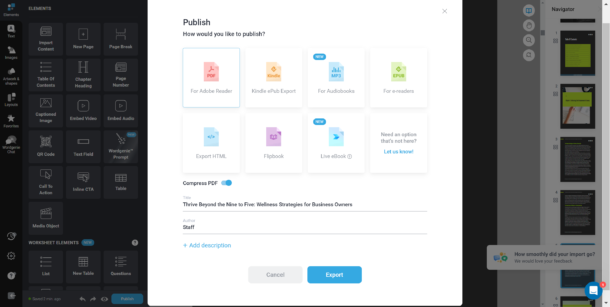
Designrr is the only platform dedicated specifically to transforming content from any source—blog posts, YouTube videos, podcast audio, Word documents, Google Docs, PDFs—into professionally formatted eBooks, flipbooks, and PDFs.
How it works:
- Import content from any URL (WordPress, Medium, Squarespace, any CMS), YouTube video URL (auto-transcribes and formats), podcast audio file (transcribes and creates chapters), or existing documents (Word, PDF, Google Docs)
- Choose a template from 100-300+ professionally designed layouts (business books, workbooks, children’s books, cookbooks, fiction novels, lead magnets)
- Auto-generate structure including table of contents, page numbers, headers/footers, and chapter breaks
- Customize design with drag-and-drop editor for images, fonts, colors, and layout
- Export to PDF (standard or print-ready), Kindle (MOBI), ePub (Apple Books, Google Play), HTML embed, or interactive flipbook
The Wordgenie AI assistant can generate complete eBook drafts from a topic in 5-10 minutes. You provide a topic and outline, Wordgenie writes the content, and Designrr formats it. The quality is decent for lead magnets and early drafts, though human editing improves it significantly.
Use cases where Designrr excels:
- Turn blog post series into downloadable guides
- Convert podcast seasons into eBooks
- Create workbooks and worksheets from educational content
- Generate lead magnets for email list building
- Produce Kindle books from existing content libraries
Use cases where it struggles:
- Fiction publishing requiring granular typography control
- Coffee table books or heavily visual publications
AI Writing and Text Transformation Platforms
The text repurposing category is crowded and confusing because “AI writing tool” can describe everything from simple blog post generators to enterprise content platforms with governance and workflow automation.
The key distinction: most AI writing tools help you create content. These tools help you transform content you’ve already created into different formats while maintaining your voice.
Jasper AI
Best for: Marketing teams, agencies, enterprises needing brand consistency
Pricing: Pro $59/seat/month annually | Business (custom pricing)
Key features: Brand Voice, Content Pipelines, AI Agents
Compliance: SOC 2, GDPR, enterprise SSO
Official site: jasper.ai
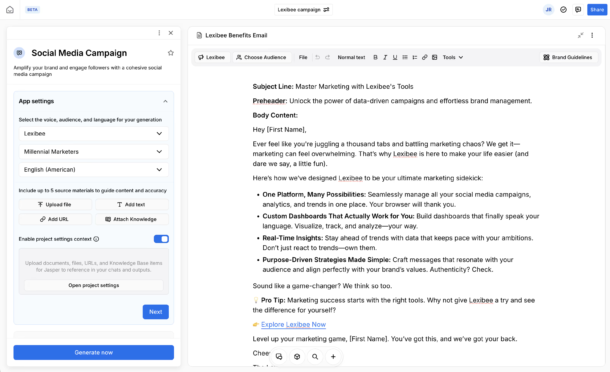
Jasper has grown significantly from its origins as a blog post generator. The current platform includes Canvas (writing workspace), Grid (spreadsheet-based content management), Studio (no-code AI app builder), Agents (marketing AI agents), and Content Pipelines that automate the entire content lifecycle from ideation through distribution.
Brand IQ is Jasper’s core differentiator for enterprise use. It provides:
- Brand Voice training on your company’s writing style (upload 15,000+ words of existing content for AI to learn patterns)
- Visual guidelines for logos, colors, fonts, and design standards
- Style guides for terminology, tone, and messaging frameworks
- Knowledge bases for product information, company facts, and industry context
The practical effect: when 50 team members use Jasper to create content, output maintains consistent brand voice instead of sounding like 50 different people wrote it. For companies dealing with “generic AI tone” complaints, this governance layer matters enormously.
The Pro plan ($59/seat/month annually) includes 2 Brand Voices, 5 Knowledge assets, and a plagiarism checker. The Business tier adds unlimited Brand Voices, custom AI agents, advanced workflow automation, and API access.
Where Jasper excels:
- Multi-channel campaigns requiring brand consistency
- Teams of 5+ content creators needing guardrails
- Regulated industries requiring compliance checks
- Content operations requiring approval workflows
Where it’s overkill:
- Solo creators with simple repurposing needs (you’re paying for team features you don’t use)
- Basic social media scheduling (dedicated tools like Buffer are better)
- Pure blog writing (ChatGPT Plus at $20/month handles this well)
Social Media Management Tools That Actually Repurpose
Most social media management tools are really scheduling and analytics platforms. The tools in this section actually transform content formats and adapt messaging for different platforms.
Buffer
Best for: Solo creators and small brands managing 3-15 social accounts
Pricing: Free (3 channels) | Essentials $5/channel/month annually | Team $12/channel/month annually
Platforms: 11 including Bluesky, Threads, Mastodon, YouTube, TikTok, Instagram, Facebook, LinkedIn, X, Pinterest, Google Business
Official site: buffer.com
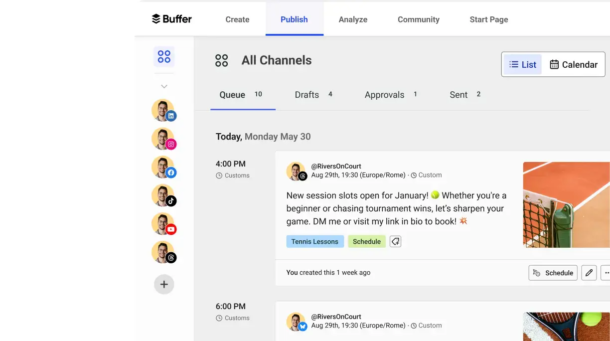
Buffer remains the most accessible social media management tool with genuinely useful free and low-cost tiers.
Even the free plan includes:
- 3 social channels
- 10 scheduled posts per channel
- AI Assistant for caption writing
- Community inbox for managing comments/DMs
- Basic analytics
The AI Assistant deserves special attention because it’s included on every plan—even free. It suggests post variations, rewrites captions for different platforms, generates hashtags, and creates image descriptions for accessibility. The quality sits between ChatGPT and Jasper—good enough for most use cases, occasionally needs editing for brand voice.
Essentials ($5/channel/month annually) adds unlimited post scheduling, link-in-bio landing pages, and enhanced analytics. Team ($12/channel/month annually) adds team collaboration, approval workflows, customer engagement features, and advanced analytics.
Buffer now supports Bluesky, Threads, and Mastodon—making it one of the first mainstream schedulers to embrace decentralized and alternative platforms. This matters for creators hedging against platform volatility.
Limitations: Buffer doesn’t auto-resize content or reformat post structures for different platforms. It schedules and publishes, but strategic adaptation remains manual. For simple multi-platform posting, it’s excellent. For sophisticated cross-platform repurposing, you need additional tools.
Repurpose.io
Best for: Creators and agencies needing hands-free cross-platform distribution
Pricing: Starter $349/year (~$29/month) | Premium $999/year (~$83/month) | Agency $1,790/year (~$149/month)
Free tier: 10 video workflows
Platforms: YouTube, Facebook, TikTok, Instagram, LinkedIn, X, Pinterest, Google Drive, Dropbox, WordPress, Vimeo, Amazon
Official site: repurpose.io
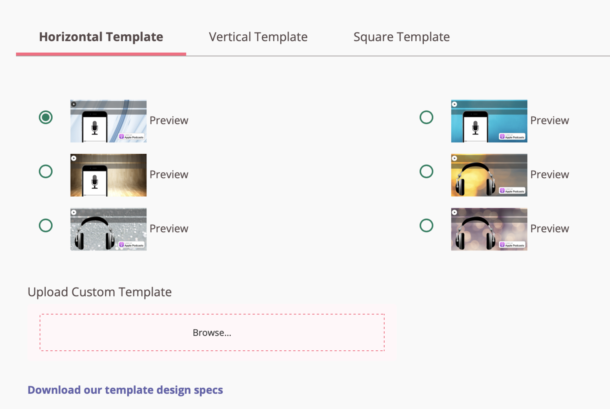
Repurpose.io functions as automation glue between platforms. Instead of manually downloading videos from YouTube, editing them, and uploading to TikTok, you define source-to-destination workflows once and content flows automatically.
Workflows work like this:
- Connect source by linking your YouTube channel, Facebook page, podcast RSS feed, or cloud storage
- Define destination and select TikTok, Instagram Reels, LinkedIn, or other platforms
- Set transformation rules to auto-resize for vertical video, remove watermarks, add intro/outro cards, and insert captions
- Activate workflow so every new video you publish to the source automatically processes and publishes to destinations
The platform is an official partner of Meta, YouTube, Snapchat, TikTok, and Amazon—meaning integrations use official APIs with proper permissions rather than workarounds.
The Starter plan ($349/year annually) supports 3 accounts per network and 5,000 published videos/month. The Agency plan ($1,790/year) scales to 25 accounts per network with unlimited publishing—essential for agencies managing multiple clients.
Where Repurpose.io excels:
- High-volume content creators publishing daily
- Agencies managing 10+ client accounts
- Podcasters distributing audio to 5+ platforms
- Video creators maintaining presence on 8+ social networks
Where it’s unnecessary:
- Occasional content creators (monthly posting)
- Single-platform focus (you’re paying for multi-platform features you don’t use)
- Creators who need extensive per-platform customization (automation reduces personalization)
One significant limitation noted: Repurpose.io handles technical reformatting extremely well but doesn’t adapt messaging or creative approach for different audiences. A YouTube video talking about “in this episode we’ll discuss…” sounds awkward when auto-posted to Instagram where episodic framing makes less sense.
Lately.ai
Best for: Enterprise teams and agencies (individual creators should skip)
Pricing: Growth ~$239/month (25 social channels, 5 users)
Status: Moving to “Kately” AI agent (currently in pre-launch waitlist)
Official site: lately.ai
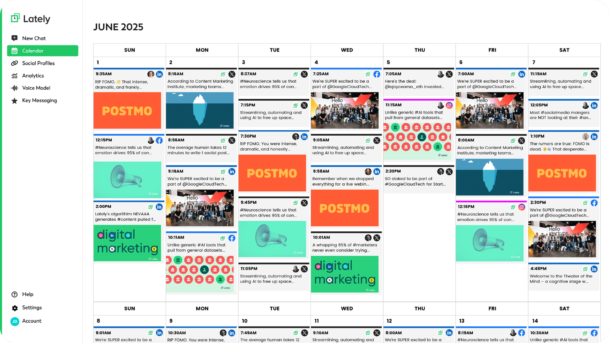
Lately.ai occupies an interesting transitional moment. The existing platform uses neuroscience-driven AI to learn your brand’s voice and generate social posts from long-form content—but they’re actively transforming the product into “Kately”, described as “the world’s first superintelligent social media agent.”
The current Lately platform analyzes your historical social posts to identify patterns in what performs well, then generates new posts from blogs, podcasts, and videos in that learned style. The AI prioritizes the language and phrases that historically drove engagement for your specific audience.
At $239/month for the Growth plan (25 social channels, 5 user seats, this is positioned for enterprises and agencies, not individual creators. The value proposition centers on teams needing to maintain brand voice consistency across many channels and contributors.
The Kately transition suggests the platform is moving toward agentic AI—systems that make autonomous decisions rather than just following instructions. The current waitlist and limited public information makes it difficult to recommend until the product stabilizes.
Visual Content Repurposing and Design Tools
Visual repurposing often gets overlooked in discussions focused on video and text, but transforming content into infographics, carousels, quote graphics, and visual presentations represents a significant opportunity—particularly for LinkedIn and Instagram audiences.
Canva
Best for: Everyone from beginners to professional designers
Pricing: Free (limited) | Pro $10/month annually | Teams $8.33/person/month annually (5-person minimum)
Key feature: Magic Switch for format transformation
Assets: 140M+ premium templates, images, videos, graphics
Official site: canva.com
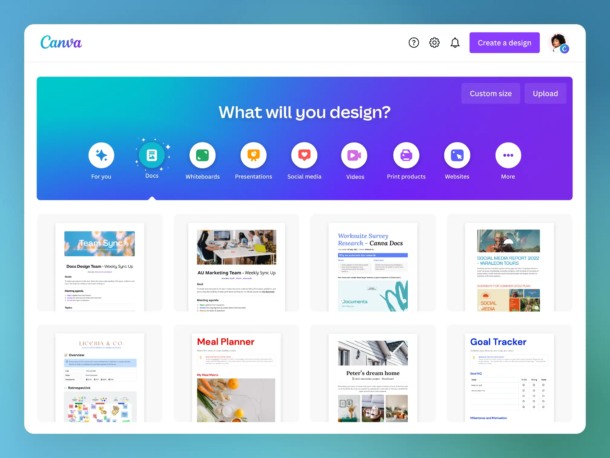
Canva transcends simple design tools to become a genuine content repurposing platform through Magic Switch—the ability to transform designs between formats, languages, and dimensions with one click.
How Magic Switch works:
- Create an Instagram post, then Magic Switch to LinkedIn carousel (automatically reformats aspect ratio, adjusts text sizing, restructures content flow)
- Design an English presentation, then Magic Switch to Spanish, French, and Mandarin (AI translates and adjusts text blocks to accommodate different text lengths)
- Build a static infographic, then Magic Switch to animated video (adds motion to elements, creates transitions, generates voice-over)
- Create a portrait social post, then Magic Switch to landscape, square, and story formats (repositions elements, adjusts composition)
Magic Switch maintains design coherence about 85% of the time. The remaining 15% requires minor manual adjustments—typically text sizing or element repositioning.
Dream Lab (powered by Leonardo.ai’s Phoenix model) dramatically improved Canva’s AI image generation. Earlier versions produced obviously AI-generated images with uncanny proportions and odd details. Dream Lab generates images comparable to Midjourney or DALL-E for most use cases.
Canva Pro ($10/month annually) includes:
- 140M+ premium templates, images, videos, graphics, audio
- 1TB cloud storage
- 500 Magic Write uses per month (AI text generation)
- Content Planner supporting 8 platforms (Instagram, Facebook, LinkedIn, Pinterest, TikTok, X, Slack, Tumblr)
- Brand Kit (colors, fonts, logos)
- Background remover
- Magic Eraser
- Resize Magic
The Teams pricing recently shifted to per-seat billing, representing roughly a 300% increase for small teams. Previously, Teams cost approximately $120/year flat for up to 5 users. Current pricing is $8.33/person/month annually ($100/year/person) with a 5-person minimum—totaling $500/year for 5 users.
Where Canva excels for repurposing:
- Blog content into visual quote graphics
- Podcast episodes into audiogram covers and episode cards
- YouTube videos into thumbnail creation and teaser graphics
- Long-form articles into carousel presentations for LinkedIn/Instagram
- Webinar slides into social media graphics
Limitations: Canva’s strength is visual transformation, not content transformation. It won’t rewrite your blog post for LinkedIn or extract clips from videos. It handles the visual presentation layer of repurposing, not the content strategy layer.
Ten Critical Mistakes Creators Make When Choosing Tools
After analyzing 100+ tools and reviewing hundreds of creator experiences, these mistakes appear repeatedly.
1. Confuse Reformatting With Repurposing
The most common error: assuming that resizing a video or adding captions constitutes repurposing. Real repurposing adapts the message, structure, and presentation to match platform context.
Example: A 10-minute YouTube video about “5 Frameworks for Better Time Management” becomes:
- Bad repurposing: Same video cropped to vertical, posted to TikTok
- Good repurposing: 5 separate TikToks, each explaining one framework with platform-appropriate hooks and pacing
Most tools only reformat rather than truly repurpose. Human judgment remains essential for strategic adaptation.
2. Implement Too Many Tools Simultaneously
I see creators start with OpusClip, Descript, Jasper, Castmagic, Buffer, Repurpose.io, and Canva all at once. Within two weeks, they’re overwhelmed by subscription costs ($200+/month), confused about which tool does what, and spending more time managing tools than creating content.
Start with 2-3 core tools addressing your primary content type:
- Video-first creators: OpusClip + Canva + Buffer ($30-40/month)
- Podcast-first creators: Podsqueeze + Canva + Buffer ($25-35/month)
- Text-first creators: ChatGPT Plus + Canva + Buffer ($40-45/month)
Add tools based on demonstrated need, not anticipated features you might use someday.
3. Fall for Free-Tier Traps
Free plans with watermarks, 3-day storage expiration (OpusClip, Vizard.ai, Kapwing), and aggressive usage caps create a predictable pattern: you invest time learning the tool, build it into your workflow, hit limits within 2-3 weeks, then face an awkward choice between downgrading quality or paying for premium tiers.
For tools you’ll use regularly, transparent paid plans are more cost-effective than attempting to scale on limited free tiers. Free tiers work well for testing workflows and occasional use—not sustainable production.
4. Copy-Paste Across Platforms Without Adaptation
Each platform has unique audience expectations, formats, and algorithms. A 1,500-word LinkedIn article doesn’t work as a TikTok caption. A YouTube video opening with “Hey guys, welcome back to the channel” sounds awkward on LinkedIn where that parasocial framing makes less sense.
Tools like Repurpose.io handle technical reformatting (aspect ratios, file types, platform requirements) extremely well. Strategic adaptation of messaging, tone, and structure still requires human input.
Think of tools as handling the “mechanical” layer of repurposing while you handle the “strategic” layer.
5. Overlook Brand Voice Governance
As AI-generated content proliferates, maintaining consistent brand voice becomes critical. Generic AI tone—overly enthusiastic, buzzword-heavy, lacking personality—is increasingly recognizable and untrustworthy.
Tools with Brand Voice features (Jasper’s Brand IQ, Castmagic’s voice training, Synthesia’s brand kits) prevent the tone drift that happens when multiple team members or AI systems generate content without guardrails.
For solo creators, this matters less. For teams of 3+ or agencies managing multiple brands, governance features justify higher pricing.
6. Neglect Data Privacy and Voice Ownership
ElevenLabs faced major controversy in February 2025 when their Terms of Service claimed perpetual rights to uploaded voice data. Voice actors and creators found out their voice clones could potentially be used to train ElevenLabs’ models or even licensed to other users.
Kukarella terminated its ElevenLabs partnership over these concerns. The ToS has since been modified, but the incident highlights a critical point: always review Terms of Service for voice cloning and AI avatar tools.
Questions to ask:
- Who owns the generated content?
- Can the platform use my voice/likeness to train models?
- What happens to my data if I cancel?
- Can I delete all training data?
- Are there restrictions on commercial use?
8. Bulk-Drop Repurposed Content Instead of Staggering Releases
It’s tempting to generate 20 pieces of repurposed content and publish them all immediately. This approach consistently underperforms staggered weekly distribution.
Spreading derivatives across weeks builds sustained engagement rather than a single spike. Algorithms also penalize bulk posting as potential spam.
Optimal cadence: 1-2 pieces of repurposed content per platform per week, with at least 48 hours between posts on the same platform.
9. Ignore SEO Cannibalization
Repurposed content can compete with itself in search results. If your blog post, YouTube video transcript, and podcast show notes all target “best content repurposing tools,” they’ll compete for the same search rankings.
Strategy: Map primary and secondary keywords per piece. Your blog post targets the main keyword, video targets video-specific longtail queries (“how to choose content repurposing tools”), podcast show notes target question-based queries (“what are content repurposing tools”).
Proper keyword mapping prevents internal competition and actually improves aggregate rankings by demonstrating topic authority.
10. Choose Tools for Features Rather Than Workflow Fit
The tool with 50 features that doesn’t integrate with your CMS, podcast host, or social scheduler creates more friction than a simpler tool that fits seamlessly.
Before evaluating features, map your actual workflow:
- Where does content originate? (WordPress, YouTube, podcast RSS, Google Docs)
- What transformations do you need? (video clips, transcripts, social posts, graphics)
- Where does content publish? (which platforms, how many accounts)
- Who’s involved? (solo, team approval, client review)
Evaluate integration depth (Zapier connections, native APIs, direct platform integrations) before feature lists. A tool that integrates poorly might require manual file downloads, uploads, and copy-pasting that negates its time-saving benefits.
Build Your Tool Stack Based on Creator Type
| Creator Type | Primary Content | Core Tools | Monthly Cost |
| Solo Creator (Video) | YouTube, TikTok, Reels | Descript + Canva Pro + Buffer | $30-50 |
| Solo Creator (Podcast) | Audio + some video | Podsqueeze + Canva Pro + Buffer | $21-31 |
| Solo Creator (Text) | Blog, newsletter, LinkedIn | ChatGPT Plus + Canva Pro + Buffer | $40 |
| Solo Creator (eBook) | Lead magnets, course materials | Designrr + Canva Pro + Buffer | $44-54 |
| Small Team | Mixed content, 2-5 people | Descript + Vizard.ai + Repurpose.io + Canva Teams + ChatGPT Plus | $130-180 |
| Agency | Client content at scale | OpusClip Pro + Descript + Repurpose.io Agency + Jasper + Castmagic + HeyGen/Synthesia + Canva Teams | $900-2,200 |
| Enterprise | Global teams, compliance needs | Jasper Business + Synthesia Enterprise + Descript Enterprise + Typeface + Sprout Social | $3,000-10,000+ |
What each tier gets you:
Solo creators get the essentials—video or audio processing, visual design, and social scheduling. Pick based on whether your primary content is video (use Descript or OpusClip), audio (use Podsqueeze or Castmagic), text (use ChatGPT Plus), or eBooks/lead magnets (use Designrr). Add Canva for visuals and Buffer for scheduling.
Small teams add collaboration features, brand kits, and automated distribution. Descript scales to multiple users. Vizard.ai provides team workspaces. Repurpose.io handles cross-platform automation. Canva Teams supports collaborative design.
Agencies need white-label capabilities, client workspaces, and brand governance. OpusClip and Repurpose.io offer agency plans with multiple client accounts. Jasper provides Brand IQ to prevent voice drift across team members. Add AI avatars (HeyGen or Synthesia) for clients uncomfortable on camera.
Enterprise prioritizes security certifications (SOC 2, ISO, GDPR), SSO, API access, dedicated support, and compliance controls. Free tiers disappear. The value proposition shifts from features to risk reduction and scale.
Start Simple, Expand Based on Need
If you’re feeling overwhelmed by options, start here.
Absolute beginners should start with just ChatGPT Plus ($20/month) and Canva Free. Use ChatGPT to transform long content into social posts, video scripts, and newsletter ideas. Use Canva to create visual versions. This $20/month combination covers 60-70% of basic repurposing needs while you learn what additional capabilities you actually need.
Video creators should prioritize Descript or OpusClip based on whether you need editing capabilities (Descript) or primarily clip generation (OpusClip). Add Canva for visuals and Buffer for scheduling.
Podcast creators should start with Podsqueeze ($5.99/month) for comprehensive text repurposing, add Canva for visual content, and expand to Castmagic if your podcast becomes a primary business driver.
Text-first creators need strong AI writing (ChatGPT Plus or Jasper if you’re on a team) plus visual design (Canva) plus scheduling (Buffer).
The tool scene will continue changing rapidly. Features that cost premium pricing today will become standard tomorrow. New categories will emerge as AI capabilities advance. The winning approach isn’t finding perfect tools—it’s building flexible workflows that can adapt as tools change.
What really counts is if your content strategy actually helps your audience on the platforms they like, not just the tools you pick. The best way to reuse content is when your tools just work seamlessly, making it super easy to share everywhere without you having to think too much about it. That way, you still get to use your own smarts to make sure the content is actually good.
Frequently Asked Questions About Content Repurposing Tools
Get answers to the most common questions about choosing and using the best content repurposing tools for creators
What’s the difference between content reformatting and true content repurposing?
Reformatting simply changes the technical format of your content—like cropping a horizontal video to vertical or adding captions. True repurposing transforms your content to match both the format and the context of a different platform. For example, turning a 10-minute YouTube video about time management into five separate TikToks, each covering one framework with platform-appropriate hooks and pacing. The message, structure, and presentation are all adapted to fit the new audience’s expectations.
What are the best content repurposing tools for solo creators on a budget?
For solo creators, the best approach depends on your primary content type. Video-first creators can start with OpusClip, Canva, and Buffer for around $30–40/month. Podcast-first creators should consider Podsqueeze, Canva, and Buffer at roughly $25–35/month. Text-first creators can use ChatGPT Plus, Canva, and Buffer for about $40/month. If you’re just getting started, ChatGPT Plus ($20/month) and Canva Free cover 60–70% of basic repurposing needs.
How do AI video clipping tools like OpusClip and Vizard.ai work?
AI video clipping tools analyze your long-form video’s spoken words, visual elements, sound patterns, and emotional tone to automatically identify the most engaging moments. When you upload a video, these tools typically find 10–15 potential clips, rank them by predicted engagement (sometimes called a “Virality Score”), add animated captions, generate thumbnails, and format the clips for platforms like TikTok, YouTube Shorts, and Instagram Reels. This can reduce editing time from hours to minutes.
Can I turn a single podcast episode into multiple pieces of content?
Yes—tools like Castmagic can generate over 100 content assets from a single podcast episode. These include full transcripts, show notes, SEO-optimized blog posts, platform-specific social media posts, email newsletters with subject lines, quote graphics, audiogram snippets, video clips with captions, and even multi-email nurture sequences. More affordable options like Podsqueeze offer similar core features starting at just $5.99/month.
What are AI avatar tools and who should use them?
AI avatar tools like Synthesia and HeyGen let you create presenter-style videos by simply typing a script. You choose a stock avatar or create a digital twin of yourself, select a voice, and the platform generates a realistic video. These are ideal for corporate training, educational content, social media explainers, and product demos—especially for creators uncomfortable on camera or teams needing multilingual video content. Synthesia supports 160+ voices and 130+ dubbing languages with one-click translation.
How can I repurpose blog posts and articles into eBooks or lead magnets?
Designrr is a dedicated platform for transforming existing content—blog posts, YouTube videos, podcast audio, Word documents, and PDFs—into professionally formatted eBooks, flipbooks, and downloadable PDFs. You import content from any URL or file, choose from hundreds of templates, and the tool auto-generates structure like table of contents, page numbers, and chapter breaks. It exports to PDF, Kindle (MOBI), ePub, HTML embed, and interactive flipbook formats, making it perfect for email list building and lead generation.
Are free tiers of repurposing tools worth using long-term?
Free tiers are excellent for testing workflows and occasional use, but they’re generally not sustainable for regular content production. Common limitations include watermarked exports, short storage expiration periods (as little as 3 days), and aggressive usage caps. Many creators invest time learning a tool on its free plan, build it into their workflow, then hit limits within 2–3 weeks. For tools you’ll use regularly, transparent paid plans are more cost-effective than trying to scale on limited free tiers.
How do I maintain brand voice consistency when using AI repurposing tools?
Several tools offer brand voice governance features. Jasper AI’s Brand IQ lets you train the AI on your writing style by uploading 15,000+ words of existing content. Castmagic offers voice training, and Synthesia provides brand kits. These features ensure that content generated by multiple team members or AI systems maintains a consistent tone instead of defaulting to generic AI-sounding copy. For solo creators this matters less, but for teams of three or more it’s essential.
Should I publish all my repurposed content at once or stagger it?
Always stagger your releases. Publishing 20 pieces of repurposed content simultaneously consistently underperforms compared to spreading them across weeks. Staggered distribution builds sustained engagement rather than creating a single spike, and social media algorithms can penalize bulk posting as potential spam. The recommended cadence is 1–2 pieces of repurposed content per platform per week, with at least 48 hours between posts on the same platform.
What should I consider before choosing a content repurposing tool?
Before evaluating features, map your actual workflow: where does your content originate (WordPress, YouTube, podcast RSS, Google Docs), what transformations do you need (video clips, transcripts, social posts, graphics), where does it publish, and who’s involved in the process. Then prioritize integration depth—Zapier connections, native APIs, and direct platform integrations—over feature lists. A tool that doesn’t integrate well with your existing setup may require manual downloads, uploads, and copy-pasting that negates its time-saving benefits.



