⚡️ Key Takeaways → Choose Canva if you only need a designed PDF lead magnet, a workbook, or a download — and you’ll never put it on Kindle, Apple Books, or Kobo. → Use Adobe InDesign if you’re already a designer, you’re building a fixed-layout picture book or cookbook, or you’re publishing many books and the learning curve is worth amortizing. → Or, pick Designrr if you have content already written (a blog, a podcast, a Word draft) — or want AI to draft it for you — and you need real eBook formats (PDF, Kindle ePub, flipbook, audiobook) without learning a design tool. → Best setup: Designrr alone. It does what Canva and InDesign each only do separately.
⚡️ Conclusion Canva is fast but caps out at PDF. InDesign exports every format that matters but takes weeks to learn. Canva is for non-designers making lead magnets; InDesign is for designers making polished books. If you want InDesign’s export breadth without the learning curve, Designrr sits in the middle — built for people who want to publish without designing, with import from blog URLs, podcasts, and videos plus Wordgenie AI to write or polish the content itself.
Most “Canva vs InDesign” articles tell you Canva is easy and InDesign is professional, then leave you to figure out which one matches your actual project. That framing misses the part that decides the whole thing: the file format your eBook needs to be in at the end. Get that right and the rest of the decision takes about two minutes.
According to Statista, the global eBook market is on track to hit $15.14 billion in 2026, and self-published titles now make up a meaningful share of US Kindle Store sales. The tool you pick to make your book is no longer a side decision.
Canva vs Adobe InDesign: Quick Comparison
| Canva (Pro) | Adobe InDesign | |
|---|---|---|
| Best For | Lead magnets, PDFs, fast covers | Designers publishing complex, fixed-layout books |
| Standout Feature | Drag-and-drop template library | Reflowable + fixed-layout EPUB 3 export |
| Pros | Easy to learn, real-time collaboration, huge template library | Full typographic control, interactive PDF, Adobe Fonts included |
| Cons | No EPUB export, page-count limits on long designs, Pro Content license restrictions | Steep learning curve, expensive month-to-month, no content import |
| Price | $18/mo Pro · $25/seat/mo Business | $22.99/mo annual paid monthly · $34.49/mo month-to-month |
| Content Import | Manual paste, basic image upload | Word DOCX, RTF, manual paste |
| Output Formats | PDF, PNG, JPG, MP4, GIF, PPTX (no EPUB) | EPUB 3 (reflowable + fixed), interactive PDF, print-ready PDF, HTML |
| Templates | 250,000+ across all categories | Hundreds of book templates, mostly third-party |
| Editing Approach | Visual-first, page-by-page | Style-based (paragraph/character styles, master pages) |
| Integrations | Direct social, Google Drive, Dropbox | Adobe ecosystem (Illustrator, Photoshop, InCopy) |
| Team Collaboration | Real-time editing, comments, brand kits | Limited; needs InCopy for true collaboration |
| Customer Support | Chat + help center | Adobe Help, large community forum |
Who Is Canva Best for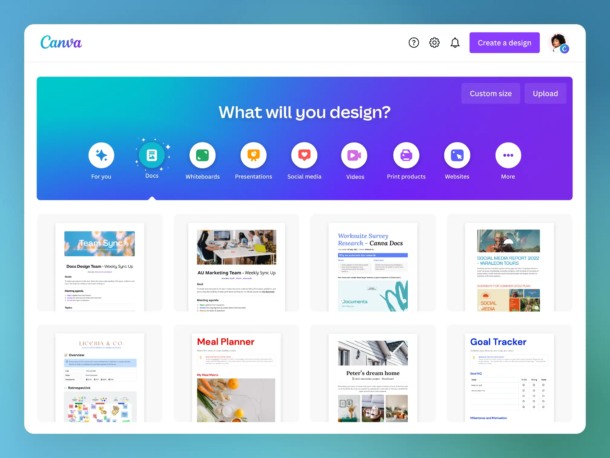
- Marketers and coaches producing PDF lead magnets, workbooks, and course companions.
- Solopreneurs who need fast covers for KDP without learning a design tool.
- Teams that value real-time collaboration over publishing depth.
- Anyone whose eBook will be downloaded from a website or sent by email, not sold through Kindle or Apple.
Sidenote. Canva exports PDF, PNG, JPG, MP4, GIF, and PPTX — full stop. There is no native EPUB output at any plan tier. To put a Canva design on Kindle, you’d export PDF, convert externally (Calibre or Kindle Create), and re-upload. That workflow routinely produces formatting failures.
D. on G2 (on Canva for eBooks): “It is extremely simple and user friendly. Great if you have no design experience and need to create a quick, simple graphic. It’s so simple, there isn’t a lot of flexibility in design options.”
The honest read: Canva is the right tool for short, visual PDFs. The trouble shows up the moment “eBook” means something a retailer needs to ingest. Canva’s template library is enormous, but most of those templates were built for social graphics and presentations — the book-specific ones are a small slice. And the Canva Content License Agreement restricts what you can do with premium Pro Content inside templates you sell as standalone PDFs, which catches a lot of new sellers.
Canva also doesn’t publicly document a hard page-count ceiling for design creation, but the help center caps PDF uploads into Canva at 500 pages and 300 MB — and long-time users consistently report performance and save issues on book-length designs. For a typical 60,000-word nonfiction book, the practical workflow involves splitting your manuscript across multiple Canva files and merging the PDFs externally.
Who Is Adobe InDesign Best for?
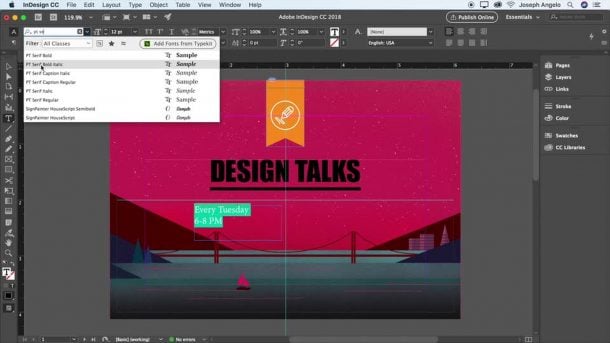
- Graphic designers already living inside Adobe Creative Cloud.
- Publishers and agencies producing fixed-layout books — picture books, cookbooks, comics, art books, textbooks.
- Authors who go to commercial print with CMYK, bleed, and spot color requirements.
- Anyone building a long-term skill they’ll use across many books and clients.
Sidenote. InDesign exports true EPUB 3, both reflowable and fixed-layout. That matters because Amazon KDP stopped accepting MOBI files on March 18, 2025. EPUB is now the preferred Kindle input, and InDesign is the gold-standard export tool for it — if you can drive it.
M. on G2 (on Adobe InDesign): “The learning curve is real. When I first started, even simple tasks felt buried behind menus or panels I didn’t fully understand. It’s not the kind of tool you can casually open and figure out in a few minutes.”
The honest read: InDesign does everything a serious book project requires. Master pages, paragraph styles, anchored objects, GREP, interactive PDFs with embedded video, ARIA roles for accessibility — it’s all there. The catch is the time to competence. Noble Desktop’s training program puts basic layouts at one to two days and full mastery at “a few weeks to a few months.” For a single book, most authors won’t finish the ramp.
Pricing also surprises people. The single-app plan is $22.99/month on annual paid monthly, but Adobe’s own pricing page shows the month-to-month rate jumps to $34.49 — and there’s a 50% cancellation penalty on annual plans after the 14-day grace window.
Designrr as an Alternative: The Bridge Between “Too Limited” and “Too Hard”
If Canva can’t reach Kindle and InDesign takes weeks to learn, what do you use when you have a blog post, a Word draft, or a podcast you want to turn into a real eBook today — or when you don’t have content yet and need AI to help draft it?
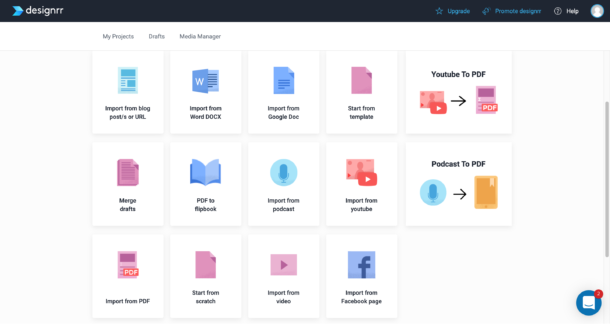
Designrr was built for exactly that gap. It’s a cloud-based platform that imports content from anywhere — blog URL, Word, Google Doc, PDF, YouTube, podcast, video — or generates it from scratch with Wordgenie AI, then outputs professional eBooks, flipbooks, audiobooks, and print books from the same source. No installation, no design degree, no six-month ramp.
Designrr follows a five-step workflow we call Import → Clean → Template → Design → Publish. It’s the same shape every project takes, and it’s why most users have a publishable draft within an hour of signing up.
Why people choose Designrr over Canva and InDesign
1. Import from anywhere — blog, YouTube, podcast, Word, Google Doc, PDF
The defining feature isn’t the templates. It’s the import. Designrr takes a blog URL and pulls the content into a draft, automatically stripping ads, navigation, and sidebars.
- Import from Blog Post or URL — paste any blog address; supports multi-URL combine to merge several posts into one book.
- Import from Word, Google Docs, PDF — drag in your draft and Designrr rebuilds it as an editable book project.
- Import from YouTube, Vimeo, Podcast, audio/video files — transcribes audio and auto-captures scene-change screenshots from video.
2. Publish to every format from a single source
This is where the wedge gets sharp. From one Designrr project, you can export to:
- PDF (all plans) — for lead magnets, downloads, email opt-ins.
- Kindle ePub / .mobi / iBooks ePub (Pro+) — reflowable text the Kindle Store and Apple Books actually want.
- Flipbook (all plans from Designrr PDFs; Pro+ from any PDF) — hosted page-flipping book with password protection.
- Audiobook (Premium+) — AI text-to-speech with multi-speaker voices.
- Print Books for KDP (Premium) — paperback and hardcover with KDP-compliant dimensions.
- HTML Embed Code (Premium, Agency Premium) — embed the book directly on a sales or membership page.
Canva exports PDF only. InDesign exports PDF and EPUB. Designrr is the only one that covers all six.
3. 800,000+ copyright-free images and 922 Google Fonts built in
If you sell your book with Canva templates, you have to read the Content License Agreement carefully — premium Pro elements have separate rules. With Designrr, the Media Manager includes 800,000+ copyright-free images from Unsplash and Pixabay, plus 922 Google Fonts, all licensed for commercial use inside the platform. On the Premium plan, the AI Image Generator adds 100 generated images per day (capped at 1,000 per month).
4. Wordgenie AI generates and edits content inline
Every Designrr account is preloaded with 2,000,000 Wordgenie credits — enough for roughly 100+ full English eBooks (each consumes ~12,000–20,000 credits). Wordgenie handles:
- Content generation — outlines, chapter drafts, full books from a topic prompt.
- Wordgenie Edit — rewrite, adjust tone, fix grammar, extend or reduce passages.
- Wordgenie Chat (Pro+) — conversational AI inside the editor.
- AI-Enhanced Editor — optimize structure, spell-check, rewrite for clarity, generate images.
Note. Connect your WordPress, Squarespace, Shopify, or HubSpot blog to Designrr and your posts will import directly into the Docs section, ready to design. The cleanup that takes hours in Canva (paste, format, paste again) happens in one click.
Designrr Pricing
| Plan | Monthly | Best For |
|---|---|---|
| Standard | $29/mo | Solo creators making PDF lead magnets from blogs |
| Pro | $39/mo | Multi-format publishers — Kindle, ePub, Flipbook, PDF import |
| Premium | $49/mo | Course creators using transcription, AI images, audiobooks |
| Business | $99/mo | Higher-volume teams (8 transcription hrs/month) |
| Agency Premium | $249/mo | Agencies — 5+ seats, dedicated client interface |
Trust line: All plans include a 7-day free trial and a 30-day money-back guarantee.
Sign up for Designrr’s special offer today!
Where Designrr Shines
- Content import beats every alternative — blog URLs, Word, Google Docs, PDFs, podcasts, YouTube videos all land as editable book projects in minutes.
- One source, six output formats — PDF, Kindle, Flipbook, Audiobook, Print Book, HTML Embed.
- Browser-based with zero install — works on Windows, Mac, anywhere with Chrome or Firefox.
- Flat-rate pricing with 2M Wordgenie credits included — no per-credit AI overages.
Where Designrr Falls Short
Honest limitations, named directly:
- Image-based PDFs can’t be imported. If your PDF was exported from Canva, scanned, or built in Adobe Distiller from a magazine, the PDF import won’t read the content. Only textual PDFs work.
- Wordgenie Chat doesn’t see what’s inside your project. The conversational AI is great for brainstorming chapters, outlines, and prompts, but it can’t reference the text already in your eBook. For in-project rewrites you use Wordgenie Edit instead — same AI, different entry point.
- Dynamic templates can’t be changed mid-project. Pick the wrong PRO Dynamic template and you’ll be cloning the project to start over. Use Regular/Standard templates if you want flexibility, and always for Kindle.
- Kindle/ePub export strips headers, footers, page numbers, double columns, and wrapped images. That’s a property of the EPUB format itself — reflowable text generates its own page numbers — but it surprises authors used to fixed-layout PDF design.
These aren’t dealbreakers, but they’re things you should know before you sign up. We’d rather you start the trial with realistic expectations than discover them mid-project.
What customers say about Designrr
R. on Trustpilot: “I finally found an amazing system that I can use with ease, to create my ebooks! I love the idea that you can upload to Amazon or any other platform I choose. The system is simple and user friendly.”
Verified reviewer on G2: “The possibility of designing an eBook professionally in a few minutes from a Word document. It also works very well when transforming blog articles into ebooks.”
C. on Capterra: “My client wanted me to create lead magnets based on her blog posts. The first ebook was manageable to create in Canva, but the next one was going to be a lot of work to paste everything into Canva. I thought there must be an easier way, and soon discovered Designrr.”
Designrr currently averages 4.6/5 across 190+ verified Capterra reviews and holds a 4-star TrustScore across 1,600+ Trustpilot reviews. The pattern in the praise is consistent: time saved on layout, professional-looking output, and the import workflow doing what nothing else does.
Read our Canva vs. Designrr for more information
Canva vs Adobe InDesign vs Designrr: Price
| Canva Pro | Adobe InDesign | Designrr Pro | |
|---|---|---|---|
| Starting price | $18/mo | $22.99/mo (annual paid monthly) | $39/mo |
| Month-to-month | $18/mo | $34.49/mo | $39/mo |
| Annual prepaid | $144/yr | $263.88/yr (single-app) | Varies |
| Free trial | 30-day Pro trial | 14-day refund window | 7 days |
| Cancellation penalty | None | 50% of remaining annual term | None |
| Money-back | None | 14 days | 30 days |
Verdict: Canva wins on sticker price for casual PDF work. InDesign wins for designers committed to long-term use. Designrr wins on total value once you account for export format, content import, and the time you’d otherwise spend learning InDesign or working around Canva’s limits.
Canva vs Adobe InDesign vs Designrr: Content Import
- Canva — manual paste from clipboard or basic image upload. No native blog, podcast, or document-import workflow.
- InDesign — Word DOCX and RTF import with style mapping. Strong for clean Word manuscripts; no URL, podcast, or video import.
- Designrr — blog URLs, Word, Google Docs, textual PDFs, YouTube, Vimeo (Premium), podcasts, audio files, video files. Multi-URL combine merges several blog posts into one book project. The Wordgenie AI flow can also generate a complete book from a topic prompt.
Verdict: Designrr is the only one in this category with a real content-import story. If you have a blog, a podcast, or a draft, the import alone justifies the tool.
Canva vs Adobe InDesign vs Designrr: Output Formats
- Canva — PDF, PNG, JPG, MP4, GIF, PPTX. No EPUB. No Kindle.
- InDesign — Reflowable EPUB 3, Fixed-Layout EPUB 3, interactive PDF, print-ready PDF, HTML. The gold standard for export depth — if you can drive it.
- Designrr — PDF, Kindle ePub, .mobi, iBooks ePub, Live eBook (multimedia), Flipbook, Audiobook, Print Books for KDP, HTML Embed. The widest output range from a single source.
Verdict: InDesign and Designrr both clear the Kindle/ePub bar; Canva doesn’t. Designrr adds flipbook hosting, audiobooks, and HTML embed that InDesign doesn’t natively offer.
Canva vs Adobe InDesign vs Designrr: Templates and AI
- Canva — Massive template library across categories. Magic Studio AI for writing, image generation, and translation, with monthly credit caps that vary by plan.
- InDesign — Hundreds of book templates (mostly third-party). Firefly generative AI integrated in 2026 with Text to Image, Generative Expand, Generative Fill, and AI Assistant — 500 generative credits/month on the single-app plan.
- Designrr — 100 templates on Standard, 300+ on Pro and above, plus 200+ cover designs. Wordgenie AI suite (content generation, editing, chat, hints, image generation) preloaded with 2M credits per account — covers roughly 100+ full English books before you’d need more.
Verdict: Canva wins on raw template volume across all categories. Designrr wins on book-specific templates with AI generation included. InDesign wins on typographic control once you’ve climbed the learning curve.
How to Choose the Best eBook Tool for You
Five questions that resolve this decision faster than any feature list:
- Does it import from your existing content? If you have a blog, a podcast, or a YouTube channel, the tool that pulls them into a book project saves you days. Canva and InDesign don’t; Designrr does.
- Can it publish to Kindle AND flipbook AND audiobook from the same source? Canva caps at PDF. InDesign covers EPUB and print but not audiobooks or hosted flipbooks. Designrr covers all of them from one project.
- Does it include copyright-free images and commercial-use fonts? Designrr’s 800,000+ image library and 922 Google Fonts are licensed for commercial use inside the platform. Canva’s Pro Content has restrictions you need to read; InDesign relies on Adobe Stock (separate subscription) and Adobe Fonts (included).
- Is the pricing flat, or do you pay per AI credit? Canva caps Magic Studio AI credits monthly. Adobe gives you 500 Firefly credits/month. Designrr preloads 2M Wordgenie credits per account — flat rate, no overage charges.
- Does it work in the browser, or require a download? InDesign is a desktop app that needs to phone home every 99 days to validate. Canva and Designrr both run entirely in Chrome or Firefox, no installation.
If three or more of these matter to your project, you’re past Canva and either committed to InDesign for the long term or looking for Designrr as the middle path.
Final Verdict: Canva vs Adobe InDesign vs Designrr
Canva is the right tool for fast PDFs and lead magnets — but it stops at the export menu if your book needs to reach Kindle or Apple Books. InDesign exports everything that matters and gives designers complete control, but the learning curve is real and the month-to-month pricing punishes short-term users. For most non-designer authors — whether your content is already written or Wordgenie is going to help you draft it — Designrr sits in the middle: blog-to-eBook (or topic-to-eBook) in minutes, six output formats from one source, and a flat $29–$39/month with 2M AI credits included. Start with Designrr today — connect your first content source in under 30 seconds.
Frequently Asked Questions About Canva vs Adobe InDesign
Get answers to the most common questions about choosing the right eBook design tool
Can I publish a Canva eBook to Amazon Kindle?
Not directly. Canva only exports PDF, PNG, JPG, MP4, GIF, and PPTX — there’s no native EPUB output at any plan tier. Since Amazon KDP stopped accepting MOBI files in March 2025 and now prefers EPUB, you’d need to export a PDF from Canva, convert it externally with Calibre or Kindle Create, and re-upload. This workaround routinely produces formatting failures, which is why Canva is best limited to PDF lead magnets and downloadable workbooks.
How long does it take to learn Adobe InDesign?
According to Noble Desktop’s training program, basic layouts take one to two days, but full mastery requires a few weeks to a few months. The learning curve is real — master pages, paragraph styles, anchored objects, and GREP all require dedicated time to understand. For authors publishing a single book, most won’t finish the ramp before they need to deliver. InDesign makes sense if you’re a designer planning to use it across many projects.
What’s the real cost difference between Canva and Adobe InDesign?
Canva Pro is $18/month flat. Adobe InDesign is $22.99/month on the annual paid monthly plan, but jumps to $34.49/month if you go month-to-month. Adobe also charges a 50% cancellation penalty on annual plans after the 14-day grace window — so committing to InDesign and changing your mind costs significantly more than expected. Canva has no cancellation penalty.
Does Canva have a page limit for eBooks?
Canva doesn’t publicly document a hard page-count ceiling for designs you create, but the help center caps PDF uploads into Canva at 500 pages and 300 MB. Long-time users consistently report performance and save issues on book-length designs. For a typical 60,000-word nonfiction book, the practical workflow involves splitting your manuscript across multiple Canva files and merging the PDFs externally — adding friction that doesn’t exist in tools built specifically for book-length projects.
Can I sell PDFs made with Canva’s premium templates?
Yes, but with restrictions. The Canva Content License Agreement places specific limits on what you can do with premium Pro Content elements inside templates you sell as standalone PDFs. This catches a lot of new sellers off guard, especially when they want to monetize lead magnets or sell eBooks directly. Always read the licensing terms carefully before commercializing any design that uses premium stock elements.
Which tool is better for fixed-layout books like cookbooks or picture books?
Adobe InDesign is the gold standard for fixed-layout books. It exports true EPUB 3 in both reflowable and fixed-layout formats, supports interactive PDFs with embedded video, handles ARIA roles for accessibility, and provides full control over CMYK, bleed, and spot colors for commercial print. Canva can produce fixed-layout PDFs but can’t export the EPUB formats retailers like Apple Books prefer for cookbooks and picture books.
Is there a tool that bridges Canva’s ease and InDesign’s export power?
Yes — Designrr is built specifically for that gap. It imports content from blog URLs, Word documents, Google Docs, PDFs, YouTube videos, and podcasts, then exports to PDF, Kindle ePub, iBooks ePub, flipbook, audiobook, print books for KDP, and HTML embed — all from a single source. Pricing starts at $29/month with a 7-day free trial and 30-day money-back guarantee, sitting between Canva’s price and InDesign’s complexity.
Do Canva and InDesign include commercial-use fonts and images?
InDesign includes Adobe Fonts in the subscription, but Adobe Stock requires a separate subscription for images. Canva includes a massive template and asset library, but premium Pro Content has commercial-use restrictions you need to verify. By comparison, Designrr includes 800,000+ copyright-free images from Unsplash and Pixabay plus 922 Google Fonts, all licensed for commercial use directly inside the platform with no separate agreements to navigate.
How do AI credits compare between Canva, InDesign, and Designrr?
Canva’s Magic Studio AI has monthly credit caps that vary by plan. Adobe gives you 500 Firefly generative credits per month on the single-app plan. Designrr preloads every account with 2,000,000 Wordgenie credits — enough for roughly 100+ full English eBooks at a flat rate, with no per-credit overage charges. If AI-generated content is central to your workflow, the credit structure matters as much as the base price.
Can I import a blog post or podcast directly into Canva or InDesign?
No — Canva only supports manual paste from clipboard or basic image upload, with no native blog, podcast, or document-import workflow. InDesign supports Word DOCX and RTF import with style mapping, which works well for clean manuscripts but offers no URL, podcast, or video import. Designrr is the only option in this category that handles blog URLs, Google Docs, YouTube videos, Vimeo, podcasts, and audio files as native imports, which can save days of manual reformatting.