⚡️ Key Takeaways
→ Decide what you’re making first. A store ebook (EPUB), a designed PDF and an interactive course book each need a different tool.
→ For Kindle and Apple Books, a dedicated formatter beats a word processor. Atticus and Vellum are the paid standards. Reedsy Studio and Kindle Create are free.
→ MOBI is gone. Amazon KDP no longer accepts MOBI files, so export EPUB (or KPF from Kindle Create).
→ Canva and InDesign are for designed PDFs, not reflowable store ebooks.
→ If your ebook already exists as blog posts, transcripts or a PDF, Designrr turns it into a laid-out ebook instead of making you rebuild it.
The 12 best ebook software tools at a glance
The table sorts every tool by the job it does best. The first column also shows who it suits, so you can scan straight to your situation.| Tool | Free option | Paid price |
|---|---|---|
| Google Docs Write: drafting with collaborators | Yes | Free |
| Microsoft Word Write: authors already in Word | Web version | $9.99/mo |
| Apple Pages Write: Mac users who want EPUB export | Yes | Free |
| Scrivener Write: long, complex manuscripts | Trial | $59.99 once |
| Kindle Create Format: Amazon-only books | Yes | Free |
| Reedsy Studio Format: free EPUB and print PDF | Yes | Free core |
| Atticus Format: any computer, ebook and print | No | $147 once |
| Vellum Format: Mac authors, most polished output | Free until export | $199.99 once |
| Canva Design: short visual PDFs | Yes | Per person |
| Adobe InDesign Design: full layout control | 7-day trial | $22.99/mo |
| Designrr Repurpose: posts, PDFs and audio into ebooks | Trial | $29/mo |
| Kitaboo Interactive: courses and training | No | Quote |
Figure out which kind of ebook you’re making first
Most bad software choices come from mixing up three different products that all get called “ebooks.” A store ebook is a novel, memoir or nonfiction book sold on Kindle, Apple Books or Kobo. Its text reflows to fit any screen and lets readers change the font size. That’s an EPUB file, and you want a formatter like Atticus, Vellum, Reedsy Studio or Kindle Create. A designed PDF is a lead magnet, workbook, report or guide where every page is laid out on purpose. The layout stays fixed, which is why it looks good but can’t be sold as a normal Kindle book. Canva, InDesign and Designrr make these. An interactive ebook has quizzes, video, tracking or access controls, usually for training or education. That needs a platform like Kitaboo rather than a file you export.Tools for writing the manuscript
You can write an ebook in almost anything. These four are where most manuscripts start, and three of them can export a basic ebook file on their own. If you’re still working out your routine, our guide to the writing process covers the steps before formatting.1. Google Docs

2. Microsoft Word

3. Apple Pages
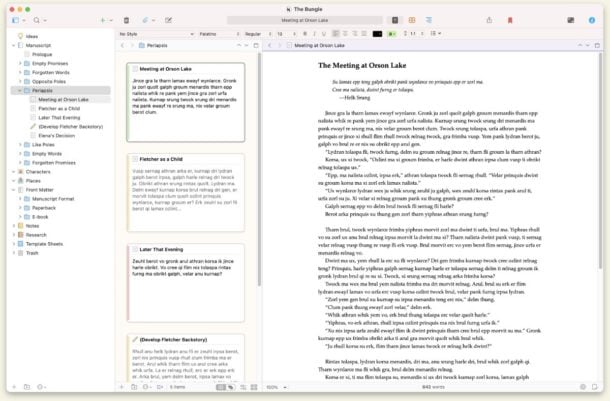
Pages is the most underrated free option for Mac, iPad and iPhone users. It exports EPUB in both reflowable and fixed layouts, which makes it workable for simple picture books as well as text-heavy books. Price: free on Apple devices. Where it falls short: it only runs on Apple devices, and its ebook templates are basic compared with a dedicated formatter.4. Scrivener
Tools for formatting ebooks for Kindle and Apple Books
Formatters take a finished manuscript and turn it into a professional ebook with chapter styling, a working table of contents and clean typography. If you plan to sell on Kindle, Apple Books or Kobo, this is the category that matters most. Our guide to self-publishing on Amazon walks through the upload once your file is ready.5. Kindle Create

6. Reedsy Studio
Reedsy Studio is a free browser-based editor that writes and formats in one place. Draft or import your manuscript, pick a design, and export an EPUB for the stores and a print-ready PDF for a paperback. It’s the best free choice if you want to sell beyond Amazon. Price: the core writing and formatting tools are free. Where it falls short: it gives you less design control than Atticus or Vellum.7. Atticus
Atticus combines a writing editor and a formatter, and it runs on Windows, Mac, Linux and Chromebook. You get ebook and print formatting, a custom theme builder, and EPUB, PDF and DOCX export. For most self-publishers who aren’t on a Mac, it’s the default paid pick. Price: $147 one-time, which covers both ebook and print with future updates included. Where it falls short: there’s no free trial, so you’re paying before you can export a file.8. Vellum
Vellum has a long-standing reputation for producing the most polished ebook and print interiors with the least effort. You import a Word file, choose a style, and it generates separate files for Kindle, Apple Books, Kobo and other stores. You can download it and format your whole book for free, then pay when you’re ready to export. Price: Vellum Ebooks is $199.99 one-time. Vellum Press, which adds paperback and hardcover interiors, is $249.99. Where it falls short: it only runs on a Mac, and it costs about $100 more than Atticus for ebook plus print.Tools for designing visual ebooks and lead magnets
Design tools give you control over every page. That’s ideal for lead magnets, workbooks and reports delivered as PDFs, and a poor fit for books sold on Kindle. Our Canva vs InDesign comparison goes deeper on choosing between these two.9. Canva

10. Adobe InDesign

A tool for turning existing content into an ebook
Plenty of ebooks aren’t written from scratch. Coaches, marketers and podcasters already have the content in blog posts, transcripts or old PDFs. They need it packaged, not rewritten.11. Designrr

A platform for interactive and educational ebooks
When an ebook needs quizzes, embedded media, reader analytics or access control, a file you export isn’t enough. You need a hosted platform.12. Kitaboo

Which file format your ebook needs
Older guides still mention MOBI, but that format is finished for publishing. According to Amazon’s KDP help center, KDP stopped accepting MOBI for reflowable ebooks on August 1, 2021, and for fixed-layout ebooks on March 18, 2025. Here’s what to export instead. EPUB is the standard for every major store, including Kindle, Apple Books, Kobo and Google Play. If you only make one file, make this one. KPF is what Kindle Create exports. It uploads cleanly to KDP but works nowhere else. PDF is right for lead magnets, workbooks and anything you sell or give away directly, because the layout stays exactly as designed. It’s a poor choice for store ebooks because the text can’t reflow on small screens. Once your file is ready, our ebook best practices guide covers the checks to run before you publish.What each setup costs
Most people need one writing tool and one formatting or design tool. These are the combinations we’d recommend for the most common situations. First novel, zero budget: $0. Write in Google Docs or Pages, then format in Reedsy Studio for every store, or Kindle Create if you’re only selling on Amazon. Self-publisher on Windows: $147 once. Atticus handles writing, ebook formatting and print in one tool. Add Scrivener ($59.99) only if you need its project organization. Self-publisher on a Mac: $199.99 to $249.99 once. Vellum Ebooks, or Vellum Press if you also want a paperback. Marketer building lead magnets from existing posts: $29/month. Designrr Standard turns blog posts into PDF ebooks. Move to Pro ($39/month) if you also want Kindle files or flipbooks. Designer-led ebook or report: $22.99/month. InDesign on the annual plan, for full layout control. If you’re planning to sell the finished book, our guide on how much to charge for an ebook covers pricing by platform.Frequently asked questions
Quick answers to the questions people ask most when choosing ebook software.What is the best free ebook software?
Reedsy Studio is the best free option if you want to sell on multiple stores, because it exports EPUB and print-ready PDF. Kindle Create is the best free option if you’re only publishing on Amazon. Google Docs and Apple Pages are fine for simple text-only ebooks.Is Atticus or Vellum better?
Vellum is better if you’re on a Mac and want the most polished output with the least effort. Atticus is better on Windows, Linux or Chromebook, and it’s cheaper at $147 for ebook and print versus $249.99 for Vellum Press.Can I still use MOBI files for Kindle?
No. Amazon KDP stopped accepting MOBI files for reflowable ebooks in 2021 and for fixed-layout ebooks in March 2025. Upload EPUB, DOCX or a KPF file from Kindle Create instead.Can I make an ebook in Canva and sell it on Kindle?
Not as a normal Kindle book. Canva exports fixed-layout PDFs, and Kindle books need reflowable text. Canva is a good fit for lead magnets and PDFs you sell directly. For Kindle, use a formatter like Atticus, Vellum, Reedsy Studio or Kindle Create.Do I need design skills to make an ebook?
No. Formatters like Vellum, Atticus and Reedsy Studio apply professional book designs automatically, and Designrr and Canva start from templates. Design skills only matter if you’re building custom layouts in InDesign.What’s the fastest way to turn blog posts into an ebook?
Import the posts into a tool built for it rather than copying and pasting. In Designrr, you paste each post’s URL, choose a template, and it builds the pages, table of contents and links for you. Then you edit, add a cover and export a PDF.Should I pay once or subscribe?
If you’re publishing a few books over several years, one-time tools like Atticus, Vellum and Scrivener cost less over time. Subscriptions like InDesign and Designrr make more sense when you produce ebooks or lead magnets regularly, or need the tool for a single project and can cancel afterward.Frequently Asked Questions About Ebook Software
Quick answers on choosing tools, file formats and costs for your ebook
What is the best free ebook software?
Is Atticus or Vellum better?
Can I still use MOBI files for Kindle?
Can I make an ebook in Canva and sell it on Kindle?
Which file format should my ebook be?
Do I need design skills to make an ebook?
What’s the fastest way to turn blog posts into an ebook?
Should I pay once or subscribe?
Can I write an ebook in Google Docs or Word?
What software do I need for an interactive ebook?