A content marketing manager needs one tool for each job in the content cycle. Those jobs are planning what to publish, running the calendar, drafting and editing, packaging content into assets, distributing it, and measuring what worked. Six of the twelve tools below can start on a free plan, and a solo manager can run the whole cycle for about $49 a month.
Each tool gets its real starting price (monthly billing first), the specific way a manager uses it, and one place where it falls short. Prices were checked in September 2026.
⚡️ Key Takeaways
→ Build the stack by job, not by brand. Six jobs, one primary tool each.
→ The free core covers more than most teams expect: Google Search Console, GA4, Looker Studio, and the free plans of Trello, Buffer and Kit.
→ Spend money where your team loses the most hours. For most teams that is research (Semrush) and editing at scale (Grammarly Pro).
→ GA4 cannot see AI answers. If ChatGPT or Google’s AI results cite you and nobody clicks, you need a separate AI visibility tool to know.
→ Your best-ranking posts are your best lead magnet candidates. Turning them into downloadable ebooks converts traffic into subscribers.
The 12 tools at a glance
The table sorts every tool by the job it does in the content cycle. Prices shown are the lowest paid plan on monthly billing. Annual billing is cheaper for most of them, and the sections below give both figures.
| Tool | Free plan | Paid from (monthly) |
|---|---|---|
| Semrush Plan: Keyword and competitor research |
Limited | $139.95 |
| Google Search Console Plan: Finding refresh candidates |
Free | n/a |
| BuzzSumo Plan: Seeing what earns shares and links |
Trial only | $199 |
| Trello Calendar: Visual content pipeline |
Yes | $6/user |
| ChatGPT Draft: Outlines, first drafts, repurposing |
Yes | $20 |
| Grammarly Edit: One style across all writers |
Yes | $30/member |
| Canva Design: Social and blog visuals |
Yes | Per person |
| Designrr Package: Turning posts into ebooks and lead magnets |
Trial | $29 |
| Buffer Distribute: Simple social scheduling |
3 channels | $6/channel |
| Kit Distribute: Lead magnet delivery and newsletters |
Up to 10,000 subs | $39 |
| Google Analytics 4 Measure: Tying content to signups |
Free | n/a |
| Looker Studio Report: Live dashboards for leadership |
Free | n/a |
How we picked these tools
A manager’s problem differs from a writer’s. You aren’t hunting for the best individual tool. You need a stack a team can share, that costs a predictable amount per seat, and that shows leadership what content did. So every tool here had to do three things: cover one job in the cycle clearly, work for more than one person, and publish its pricing. We left out tools that overlap heavily with another pick. That is why there’s one social scheduler and one email platform, not three of each.
Tools for planning what to publish
Planning tools answer one question: what should the team publish next, and why that over everything else? You need a source for search demand, a source for what you already rank for, and optionally a way to see what earns attention.

1. Semrush
Semrush is the research tool most content teams standardize on. A manager uses it for three things. It finds keywords with real search demand. The Keyword Gap report shows topics your competitors rank for that you don’t. And it builds briefs a writer can follow without a strategy call. The Content Marketing Toolkit, which handles topic research and SEO briefs, comes with the Guru plan or as a standalone Content Toolkit for $60 a month.
Pricing: Pro is $139.95/month billed monthly, or $117.33/month billed annually. Guru is $249.95/month.
Where it falls short: seats. Pro includes one user, and each extra user costs $45 a month. A four-person team on Pro pays $274.95 a month before touching an add-on.
2. Google Search Console
Search Console is free. It is the only tool that shows the actual queries Google sends to your site, with clicks, impressions, click-through rate and average position. That makes it a planning tool as much as a reporting one. Filter the Performance report for pages sitting in positions 8 to 20 with high impressions. Those pages already have Google’s attention. Most of them need an update, not a new article, and an update ships in a fraction of the time.
Where it falls short: it only covers Google, and it hides anonymized low-volume queries, so its totals will never match your analytics tool.
3. BuzzSumo
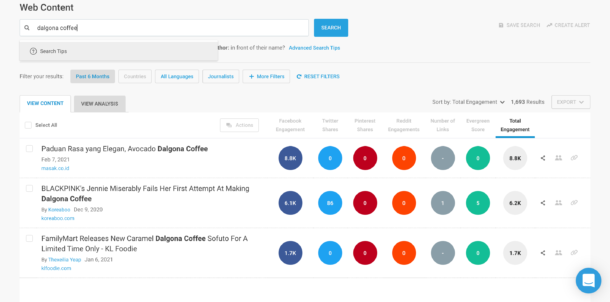
BuzzSumo shows which articles on a topic earned the most engagement and backlinks, and who shared them. Use it before you commit budget to a big piece. Search the topic, sort by engagement, and look at the format of the top ten results. If they’re all original data studies, a listicle won’t compete, and you’ve saved a writer two weeks.
Pricing: the Content Creation plan is $199/month for one user. There’s no free plan, only a trial.
Where it falls short: price. It pays off for teams that publish or pitch several substantial pieces a month. A team shipping four blog posts a month can get most of the same signal from Semrush and Search Console.
A tool for running the content calendar
Once topics are chosen, the manager’s real job starts. Pieces have to get from brief to published without anyone chasing people in Slack. That needs one shared place where every piece has an owner, a status and a date.
4. Trello
Trello turns your pipeline into a board. Make one column per stage (Idea, Brief, Drafting, Editing, Design, Scheduled, Published) and one card per piece. On paid plans, custom fields hold the target keyword and the assigned writer. Butler, Trello’s built-in automation, runs on every plan. It can move a card to Editing and assign your editor the moment a writer marks the draft done.
Pricing: free for up to 10 collaborators and 10 boards. Standard is $6/user/month billed monthly ($5 annually). Premium is $12.50/user/month ($10 annually).
Where it falls short: the Calendar and Timeline views, the ones that make a board read like an editorial calendar, are Premium features.
Tools for drafting and editing
AI now produces a large share of first drafts and outlines. That moved the manager’s job from writing toward editing, fact-checking, and keeping several writers sounding like one brand.
5. ChatGPT

Use ChatGPT for the parts of production that eat hours without needing judgment. It can turn a Semrush brief into an outline, draft FAQ answers, rewrite an intro for LinkedIn, and produce first-pass meta descriptions. Save your house style, audience and banned phrases as a Custom GPT, which the Plus plan supports. Then every writer starts from the same instructions instead of their own prompt.
Pricing: free plan available. Go is $8/month and shows ads. Plus is $20/month.
Where it falls short: it states wrong numbers with total confidence. Every statistic, price and quote in an AI draft needs a source check before it ships. For other options, see our guide to the best AI marketing tools.
6. Grammarly
For a manager, Grammarly Pro is less about typos and more about enforcing a standard across a team. You set style guide and brand tone rules once, covering product names, banned words and voice. Every writer then sees the same suggestions in Google Docs, Word or the browser. That cuts the number of edit rounds per piece, and edit rounds are where calendars slip.
Pricing: the free plan includes 100 AI prompts a month. Pro is $30/member/month billed monthly, or $12/member/month billed annually ($144 a year).
Where it falls short: monthly billing costs 2.5 times the annual rate, and the $12 on the pricing page is the annual figure. Compare it with other options in our lists of Grammarly alternatives and proofreading software.
Tools for design and packaging
A post that performs in search can also become a social carousel, an email series and a downloadable guide. Each format needs a different tool, and choosing the wrong one creates rework later.
7. Canva
Canva covers everyday visuals: blog headers, social graphics and simple infographics. For a manager, the value is the Brand Kit and shared templates. They keep freelancers and new hires on-brand without a designer reviewing every file.
Pricing: free plan available. Pro and Business are priced per person. Our Canva pricing breakdown has the current figures.
Where it falls short: it’s built for short visual pieces. If a design needs to become a Kindle book or an ePub, you’ll run into export limits. Our Designrr vs Canva comparison shows where that line sits.
8. Designrr
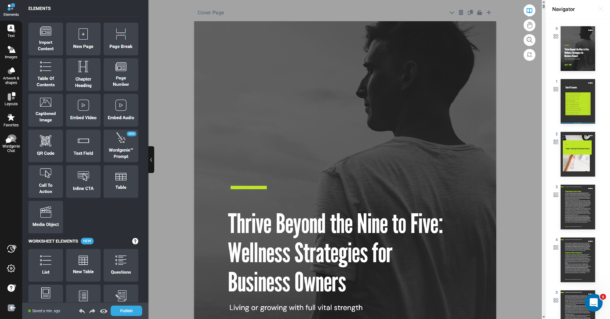
Designrr turns content you’ve already published into ebooks, lead magnets and flipbooks. Paste a blog post URL, or upload a Word doc, Google Doc or PDF, and pick a template. Designrr builds the layout with a table of contents, page numbers and clickable links. This matters for a manager because your best-performing posts are also your strongest lead magnet candidates. A guide that already ranks can become a downloadable PDF without briefing a designer or reformatting it by hand.
Pricing: Standard is $29/month. Pro ($39/month) adds PDF import, Kindle and ePub export, and the flipbook generator. Premium ($49/month) adds 4 transcription hours a month, so podcast episodes and webinars can become ebooks too.
Where it falls short: Standard, Pro, Premium and Business are all single-user plans. A team that needs several people in one account needs Agency Premium at $249/month.
Put it together: pull your top five posts by clicks from Search Console and pick the one that solves the clearest reader problem. Import it into Designrr and offer the PDF as a content upgrade on the original post. The step-by-step version is in our guide to turning blog posts into an ebook. For more formats, see our roundup of content repurposing tools.
Sign up for Designrr’s special offer today!
Tools for distribution
Distribution is where most content programs underinvest. For small teams, two channels do most of the work: social scheduling and email.

9. Buffer
Buffer queues posts per channel and publishes them on the schedule you set. It’s the easiest scheduler to hand to a team, and its free plan is usable, not a demo. If you also need social listening and brand monitoring, Sprout Social or Hootsuite cover that, at a much higher price.
Pricing: free for 3 channels with 10 scheduled posts each. Essentials is $6/channel/month billed monthly ($5 annually). Team is $12/channel/month ($10 annually).
Where it falls short: Essentials allows one user. As soon as a second person needs a login you move to Team, which doubles the per-channel rate.

10. Kit
Kit, formerly ConvertKit (renamed in October 2024), is built for list growth. It handles landing pages, forms, subscriber tags and email sequences. That makes it a natural pair for lead magnets. Someone downloads your guide, Kit tags them by topic, and a short sequence sends them to related content. More tactics are in our guide to growing your email list.
Pricing: the Newsletter plan is free up to 10,000 subscribers. Creator starts at $39/month for 1,000 subscribers and rises with list size.
Where it falls short: the free plan’s automations have been cut back, so a proper lead magnet delivery sequence usually means paying for Creator. Compare other platforms in our email marketing software roundup.
Tools for measuring and reporting
Leadership rarely asks how many posts you published. They ask what content did for the pipeline. Measurement tools turn activity into that answer. Our list of content marketing KPIs covers which numbers belong in the report.

11. Google Analytics 4
GA4 tracks what readers do after they land, such as which posts lead to signups, downloads or demo requests. Mark those actions as key events, which is Google’s current name for conversions. Then you can report content’s contribution to leads, not just pageviews.
Pricing: free.
Where it falls short: it can’t see AI answers. When ChatGPT or Google’s AI results cite your post and the reader never clicks, GA4 records nothing. Tracking that needs a separate tool, such as Semrush’s AI Visibility Toolkit, a $99/month add-on.
12. Looker Studio
Looker Studio is Google’s free dashboard tool. Connect GA4 and Search Console and build one page with the five numbers your boss cares about. Share a live link instead of rebuilding a slide deck every month.
Where it falls short: Google sources connect for free, but pulling in Kit, Buffer or ad platforms usually means paying for third-party connectors.
What this stack costs per month
The total depends almost entirely on seats. Here are two real configurations using the prices above.
Solo manager, lean stack: about $49/month. Search Console, GA4, Looker Studio, Trello, Buffer, Kit, Grammarly and Canva all stay on free plans. You pay for ChatGPT Plus ($20) and Designrr Standard ($29).
Three-person team: about $446/month on monthly billing, plus Canva. That covers Semrush Pro with one seat ($139.95), Trello Standard for three ($18), ChatGPT Plus for three ($60), Grammarly Pro for three ($90), Buffer Team on five channels ($60), Kit Creator at 1,000 subscribers ($39) and Designrr Pro ($39). Moving every tool that offers annual billing to annual brings it down to about $350. Grammarly saves the most on its own.
How to choose tools for your own team
Start with where the hours go. Track one month of production and find the stage where pieces sit longest. If briefs take a week, buy research. If drafts bounce between writer and editor three times, buy Grammarly Pro and a style guide before you buy anything else.
Then count who actually needs a login. Per-seat pricing is where stacks get expensive, and not every writer needs Semrush. One researcher building briefs for four writers costs a quarter of four Semrush seats.
Last, check the connections. A tool that doesn’t pass data to the next stage creates copy-paste work. Kit should receive every lead magnet signup automatically, and GA4 should record it as a key event. If you can’t draw that line, the report to leadership will be a guess.
Frequently Asked Questions About Content Marketing Tools
Straight answers for managers building or trimming a content stack
What tools does a content marketing manager need?
One primary tool per job in the content cycle. That means SEO research (Semrush or Google Search Console), a content calendar (Trello), drafting and editing (ChatGPT and Grammarly), design and packaging (Canva and Designrr), distribution (Buffer and Kit) and measurement (GA4 and Looker Studio). Most teams get into trouble by buying several tools for the same job, not by missing one.
What is the cheapest content marketing stack that still works?
About $49 a month for one person. Search Console, GA4 and Looker Studio are free, and Trello, Buffer, Kit, Grammarly and Canva all have usable free plans. The two paid tools are ChatGPT Plus ($20/month) for drafting and Designrr Standard ($29/month) for turning your best posts into lead magnets.
Which content marketing tools have free plans?
Google Search Console, GA4 and Looker Studio are free outright. Trello is free for up to 10 collaborators, Buffer is free for 3 channels, and Kit’s Newsletter plan is free up to 10,000 subscribers. ChatGPT, Grammarly and Canva also have free tiers. BuzzSumo and Semrush’s full toolset are the main paid-only picks.
Should I pay for content tools monthly or annually?
Pay monthly for the first month or two while you test whether the team actually uses the tool, then switch to annual. The gap can be large. Grammarly Pro is $30/member/month billed monthly but $12/member/month billed annually. Semrush Pro drops from $139.95 to $117.33 a month on annual billing.
Is Semrush worth it for a small content team?
It is if organic search is your main acquisition channel and you publish every week. If you publish a few times a month, Search Console already shows where you rank, and that is usually enough to plan refreshes. Add Semrush when you need new topic ideas and competitor keyword gaps, and give a seat only to whoever builds the briefs.
How do I track whether AI tools cite my content?
Standard analytics can’t do it. When ChatGPT or Google’s AI results cite your post and the reader never clicks, GA4 has no visit to record. You need an AI visibility tracker that runs prompts in AI assistants and logs which sources get cited. Semrush sells one as its AI Visibility Toolkit, a $99/month add-on.
How do I turn blog posts into lead magnets?
Start with the posts that already get traffic. Pull your top pages by clicks from Search Console, pick the one that solves the clearest reader problem, and import its URL into Designrr. Designrr lays it out as an ebook with a table of contents and clickable links. Offer the PDF as a content upgrade on the original post and deliver it with Kit.
Do I need Hootsuite or Sprout Social if I already use Buffer?
Only if you need social listening, meaning monitoring brand mentions and sentiment across networks. For scheduling and publishing, Buffer covers the job at a much lower price. Buffer Essentials is $6 per channel per month on monthly billing, and Team is $12 per channel once a second person needs a login.
Can AI writing tools replace a content writer?
They can replace a lot of first-draft time, but not judgment. AI handles outlines, FAQ drafts, social rewrites and meta descriptions well. It also states wrong numbers with confidence, so every statistic, price and quote needs a source check before publishing. Most teams use AI to draft and people to edit, verify and add real experience.
How many tools should a content team use?
As few as covers the six jobs: plan, calendar, draft, package, distribute and measure. Several of those can share a free tool, so a small team often runs on eight to ten. Before adding anything, check which stage of production holds pieces up longest and buy for that stage first.