Here’s the mistake almost everyone makes when they compare these two tools: they treat it like a fight. ChatGPT in one corner, Designrr in the other, one winner walks out.
But that framing is wrong, and it quietly costs people weeks of wasted effort.
Because ChatGPT and Designrr don’t do the same job. Not even close. One writes words. The other turns words into a finished, sellable book. Asking which is “better” is like asking whether a chef or an oven is better at making dinner. You’re going to want both — and knowing why is the whole point of this guide.
⚡️ Key Takeaways
- Choose ChatGPT if your bottleneck is the blank page — coming up with ideas, drafting chapters, and getting words written.
- Choose Designrr if your bottleneck is everything after the words — layout, branding, a clickable table of contents, and exporting to PDF, Kindle, or a flipbook.
- Most people need both, used in sequence: write in ChatGPT, then design and publish in Designrr.
- The real question isn’t “which tool wins?” It’s “which part of making an ebook am I actually stuck on?”
⚡️ The short version (before we go deep)
ChatGPT is a writing engine; Designrr is a publishing engine. ChatGPT gives you raw text in a chat window — no page layout, no cover, no Kindle file. Designrr takes content you already have (even a blog post, a YouTube video, or a podcast) and turns it into a designed, multi-format book. If you want ChatGPT’s drafting speed without getting stuck the moment you have to make it look like a real book, Designrr is where the second half of the work happens.
Roughly 800 million people now use ChatGPT every week, according to OpenAI’s own reporting on its user numbers — so odds are good you’ve already drafted something in it. The question is what happens next. Let’s break it down properly.
ChatGPT vs Designrr: The Quick Comparison
| ChatGPT | Designrr | |
|---|---|---|
| Best for | Generating ideas and writing the words | Designing, formatting, and publishing the book |
| What it actually is | An AI writing assistant | A cloud-based ebook design and publishing tool |
| The standout thing | Drafts text from a prompt in seconds | Turns a URL, video, or podcast into a finished book |
| Content import | You type or paste prompts | Blog posts, Word, Google Docs, PDFs, YouTube, podcasts |
| Output formats | Plain text, Markdown; Canvas can export PDF/Word | PDF, Kindle ePub/.mobi, flipbook, audiobook, print |
| Page layout & design | None — it’s a chat window | Full visual editor, 100–300+ templates, covers |
| Built-in images | Generates AI images | 800,000+ copyright-free images, plus AI generation |
| Price | Free, or Plus at $20/mo | $29–$249/mo; 7-day free trial |
| Learning curve | Almost none | Moderate — it’s a design tool |
Keep that table in mind. Every section below explains the why behind a row.
Who ChatGPT Is Actually Built For
Think of ChatGPT as the fastest, most patient ghostwriter you’ve ever hired — one who never gets tired, never judges your first draft, and works for twenty bucks a month.
It shines when your problem is getting words onto the page. Specifically:
- The idea-stage creator staring at a blank document, unsure what their ebook should even be about.
- The coach or consultant who knows their topic cold but freezes when they have to write it down.
- The author who wants a brainstorming partner for outlines, chapter titles, and rough drafts.
- The marketer repurposing messy notes or a webinar transcript into clean prose.
If structure is where you stall, this is the moment AI earns its keep — you can map out a non-fiction ebook chapter by chapter before you write a single paragraph, then fill each section in one at a time.
ChatGPT Plus runs $20 a month — a price that, notably, hasn’t changed in three years even as the feature set ballooned. That tier gives you the current top model, image generation, and Canvas, a side-by-side editing space where you can shorten, lengthen, or adjust the reading level of a passage with a click.
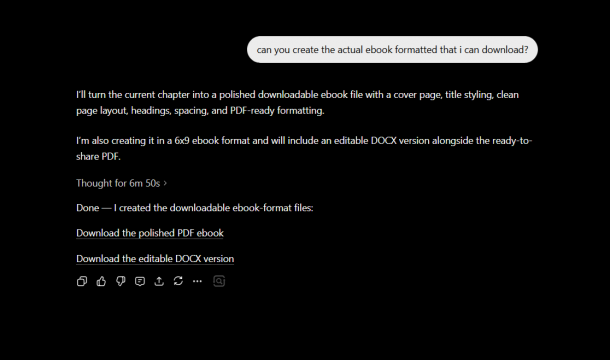
And in mid-2025, OpenAI added something genuinely useful for book work: Canvas can now export your document as a PDF, Word file, or Markdown. So if all you need is a plain text file, ChatGPT can hand you one.
Here’s where it stops, though. ChatGPT writes. It does not design. There’s no page layout, no clickable table of contents, no cover designer, no Kindle file waiting at the end. The output lives in a chat window, and a chat window is not a book.
ChatGPT is the most popular pick, but it isn’t the only one — there’s a whole field of AI writing tools built for ebooks if you want to compare how it stacks up against the specialists.
There’s a subtler limit, too. Ask ChatGPT to write a 30,000-word book in one go and it loses the thread. By chapter twelve it’s forgotten what it promised in chapter three, because it can’t hold an entire manuscript in working memory at once. You manage that by working section by section — which works, but it’s manual.
Sidenote. ChatGPT’s text is a starting point, not a finished product. The “generic AI voice” is real — readers can feel it. Feed it your own stories, data, and opinions, then clean up the AI draft so it reads like you. The draft is the easy 20%; your voice is the valuable 80%.
Who Designrr Is Actually Built For
Now flip to the opposite problem. You have content. Maybe a lot of it — blog posts, a course, a stack of podcast episodes. What you don’t have is a way to turn that pile into something that looks like a professional publication without opening InDesign and crying.
That’s Designrr’s entire reason for existing. It’s used by over 320,000 customers, and its core trick is breadth of input. You don’t start from a blank page — you start from content you already made, and its ebook creator does the heavy lifting of turning that raw material into a designed book.
Designrr is built for:
- Course creators sitting on hours of video and webinar recordings that could become workbooks and companion guides.
- Coaches and solopreneurs who want a polished lead magnet to grow an email list — fast.
- Bloggers with a back catalog of posts gathering dust that could become a downloadable book.
- Agencies producing branded client deliverables at volume.
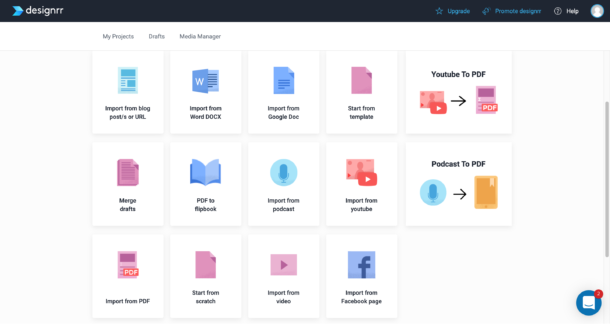
The thing that makes people fall for it is the import range. Designrr pulls content from a blog URL (stripping out the ads and navigation automatically), Word docs, Google Docs, PDFs, YouTube videos (it transcribes the audio and grabs scene screenshots), and podcasts. That’s the wedge: import from almost anywhere, publish to almost everything.
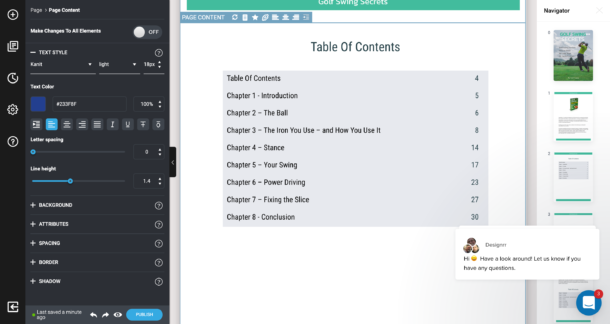
Once your content is in, you pick from 100 templates on the Standard plan or 300+ on higher tiers, drop in images from a library of 800,000+ copyright-free photos, and the tool builds your table of contents and page numbers for you. Then you publish — PDF, Kindle ePub, an interactive flipbook that readers can page through in a browser, even an audiobook.
Sign up for Designrr’s special offer today!
Sean R., a Creative Director in publishing, on Capterra: “Its intuitive interface makes it easy to turn my ideas into stunning ebooks, reports, and other digital content.” (Capterra, where Designrr holds a 4.5-star rating across 196 reviews.)
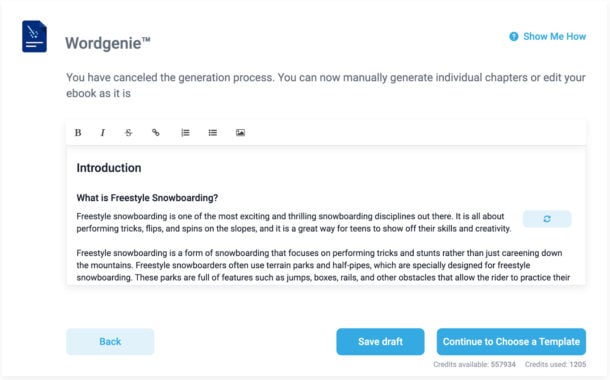
And yes — Designrr writes, too. Its built-in AI, Wordgenie, can generate a full ebook from a topic and audience: titles, outline, and chapter content, in about six steps. Every account comes preloaded with two million Wordgenie credits, and a typical English ebook runs roughly 12,000–20,000 of them, per Designrr’s own documentation. Wordgenie Edit can also rewrite, adjust tone, or fix grammar on text you paste in.
So the “ChatGPT writes, Designrr designs” line isn’t perfectly clean anymore. Designrr can do the first step and the last. But — and this is the honest part — Designrr’s own philosophy is that it’s a tool for laying out a design quickly, and that you should add your own voice and customize the result to make it your own. Even the company building the AI writer tells you not to ship its raw output. That’s good advice from any source.
The Framework That Makes the Choice Obvious
Let me give you a way to decide that takes about ten seconds.
I call it the Write → Design → Publish split, and it works because every ebook passes through exactly three stages:
- Write — get the words to exist.
- Design — make those words look like a real book.
- Publish — export to the format your reader needs.
Now ask yourself one question: which stage am I actually stuck on?
- Stuck at Write? You need an idea engine and a drafting partner. That’s ChatGPT’s home turf. (Designrr’s Wordgenie can do it too, but ChatGPT gives you more conversational control over the prose.)
- Stuck at Design or Publish? ChatGPT can’t help you here at all. This is the entire reason Designrr exists.
Most people, when they’re honest, are stuck at Design and Publish. The writing feels hard, but it’s the formatting that actually makes them quit. As the saying goes around ebook circles: writing the ebook is the easy part — designing it is where most people give up.
That’s why the smartest setup for the majority of creators isn’t one tool. It’s a relay: draft in ChatGPT, then hand the baton to Designrr to design and ship. You can paste a ChatGPT draft straight into Designrr’s Docs editor and start applying a template in minutes.
ChatGPT vs Designrr: Head-to-Head on What Matters
Writing the content
ChatGPT is the more flexible writer. You can argue with it, redirect it, ask for a punchier tone, and watch it adapt in real time. For pure prose quality and control, it’s ahead.
Designrr’s Wordgenie generates a full ebook in one structured flow, which ChatGPT can’t do in a single pass — but the prose tends to need more polishing afterward.
Verdict: ChatGPT wins on writing craft and control. Designrr wins on going from “topic” to “full draft” in one sitting.
Designing and formatting
This isn’t a contest. ChatGPT has no design layer — no templates, no layout canvas, no cover tool. Designrr is built entirely around a visual editor with templates, 200+ cover designs, a 3D cover mockup tool, and an enormous image library.
Verdict: Designrr, by a mile. This is the gap ChatGPT simply doesn’t fill.
Publishing and export formats
ChatGPT’s Canvas can now export a PDF or Word file — useful, but it’s a plain document, not a designed book. Designrr exports to PDF, Kindle ePub and .mobi, interactive flipbooks, audiobooks, and even KDP-ready paperbacks on its Premium plan — all from the same source content.
Verdict: Designrr. One source in, many publish-ready formats out.
Where Designrr Falls Short (The Honest Part)
No tool earns your trust by pretending it’s flawless, so here’s where Designrr will frustrate you. These are real, and worth knowing before you commit:
- It can’t import image-based PDFs. Scanned documents, magazine-style PDFs, or files exported from Canva won’t import — Designrr only reads textual PDFs. If your source is a picture of text, you’re out of luck.
- Kindle export strips certain elements. When you publish to Kindle ePub, Designrr removes headers, footers, page numbers, double columns, and wrapped images — because that’s how reflowable e-readers work. Great for Kindle, but don’t expect your fixed PDF layout to survive the conversion intact.
- There’s a learning curve. It’s a design tool, and design tools take a beat to learn. One reviewer, Blamah S., a marketing CEO on Capterra, loved the results but noted that “making any change on one page usually ended up having me need to go through the rest of the document and adjust little things.” (Worth knowing the “Make Changes To All Elements” toggle exists for exactly this — but you have to learn it.)
- Standard-plan PDFs are web-resolution (72 dpi). Perfect for digital downloads and lead magnets. If you want true print-shop quality, that lives in the dedicated Print Books workflow on the Premium plan.
None of these are dealbreakers for the job Designrr is built for. But you should walk in with clear eyes.
And ChatGPT’s shortcoming, to be fair to both sides? It produces text and nothing else. The moment you need a designed page, you’ve left ChatGPT’s world entirely.
Designrr Pricing at a Glance
| Plan | Monthly | Best for |
|---|---|---|
| Standard | $29 | Solo creators turning blogs and docs into ebooks |
| Pro | $39 | Multi-format publishers and Kindle authors |
| Premium | $49 | Course creators using audio, video, and print |
Every plan includes a 7-day free trial and a 30-day money-back guarantee, so you can build a real ebook before deciding. Current pricing and the full tier list (including Business and Agency plans) live on Designrr’s pricing page.
ChatGPT, for comparison, is free to start or $20/month for Plus — billed monthly, no annual lock-in required. Run both and you’re looking at roughly $49–$69/month for a complete write-and-publish stack.
Switching from a writing-only AI tool? New Designrr annual plans include a switcher discount of 15% off your first year — handy if you’re consolidating your ebook workflow into one place.
Sign up for Designrr’s special offer today!
Two Things to Get Right Before You Publish (Whichever Tool You Use)
This part rarely makes it into comparison articles, and skipping it can cost you real money.
1. Disclose AI-generated content on Amazon. If you’re publishing to Kindle, Amazon’s KDP guidelines require you to disclose AI-generated text, images, or translations when you publish or update a book. AI-assisted work (where you wrote it and AI helped edit) doesn’t need disclosing — but AI-generated content does. Don’t guess; check the box.
2. Understand that AI text alone isn’t copyrightable. The U.S. Copyright Office stated in its January 2025 report on AI that prompts alone don’t give you authorship of the output — protection comes from your human contribution: the writing you add, the editing, the selection and arrangement. Translation: the more of you that goes into the book, the more of it you actually own. One more reason to edit AI drafts heavily rather than ship them raw.
How to Choose, in Five Questions
Run through these and your answer will be obvious:
- Am I stuck on writing, or on everything after writing? Writing → ChatGPT. After → Designrr.
- Do I already have content (blog posts, videos, podcasts) I want to reuse? Yes → Designrr’s import is built for exactly that.
- Do I need a Kindle file, a flipbook, or a print book at the end? Yes → only Designrr produces those.
- Do I care how the pages actually look? Yes → you need a design tool, and ChatGPT isn’t one.
- What’s my real budget and timeline? Fastest path to a finished, good-looking book: draft in ChatGPT, design in Designrr.
The Verdict
ChatGPT and Designrr were never really rivals. ChatGPT is the best cheap drafting partner you can get, and it’ll get words out of your head faster than anything else. But it stops at words. Designrr picks up where ChatGPT goes quiet — taking your content, from almost any source, and turning it into a designed book you can actually sell, gate, or hand to a client.
If writing is your wall, start with ChatGPT. If turning content into a finished, multi-format publication is your wall — which, for most people, it is — that’s the job Designrr was built for.
The best part? You don’t have to pick a side. Draft your next ebook in ChatGPT, then connect your first content source in Designrr in under 30 seconds and watch it become a real book.
Sign up for Designrr’s special offer today!
Frequently Asked Questions About ChatGPT vs Designrr
Everything you need to know about choosing the right tool for your ebook
Can I use ChatGPT and Designrr together?
Yes — and for most creators, that’s the recommended approach. Write and draft your content in ChatGPT, then paste it into Designrr’s Docs editor to apply a template, add images, and export to your chosen format. The two tools cover different stages of the same workflow: writing and publishing.
Does Designrr have its own AI writing feature?
Yes. Designrr includes Wordgenie, a built-in AI that can generate a full ebook — titles, outline, and chapter content — from a topic and target audience in roughly six steps. Every account comes with two million Wordgenie credits included, and a typical English ebook uses around 12,000–20,000 of them. Wordgenie Edit can also rewrite, adjust tone, or fix grammar on existing text.
What file formats can Designrr export to?
Designrr exports to PDF, Kindle ePub and .mobi, interactive flipbooks (readable in a browser), audiobooks, and KDP-ready paperbacks on the Premium plan — all from the same source content. ChatGPT’s Canvas, by comparison, can export a plain PDF or Word document but produces no designed layout or Kindle file.
What content sources can Designrr import from?
Designrr can import from blog URLs (it strips ads and navigation automatically), Word documents, Google Docs, PDFs, YouTube videos (including transcription and scene screenshots), and podcasts. This makes it especially useful for repurposing content you’ve already created rather than starting from scratch.
Can ChatGPT design or format an ebook?
No. ChatGPT is a writing tool — it produces text in a chat window with no page layout, no cover designer, no clickable table of contents, and no Kindle file. Its Canvas feature can export a basic PDF or Word document, but this is a plain text export, not a designed publication. For any visual formatting, you need a dedicated design tool like Designrr.
How much does each tool cost?
ChatGPT is free to use, or $20/month for ChatGPT Plus (which adds the latest model, image generation, and Canvas). Designrr starts at $29/month for the Standard plan, with Pro at $39/month and Premium at $49/month. Every Designrr plan includes a 7-day free trial and a 30-day money-back guarantee. Running both tools together costs roughly $49–$69/month for a complete write-and-publish stack.
Is the AI-generated text from ChatGPT or Designrr copyrightable?
Not on its own. The U.S. Copyright Office’s January 2025 report confirmed that prompts alone don’t grant authorship over AI output — copyright protection comes from your human contribution: the writing you add, the editing, and the selection and arrangement of content. The more of your own voice and judgment goes into the final book, the more of it you actually own. This is one reason both tools recommend editing AI drafts heavily before publishing.
Do I need to disclose AI-generated content when publishing on Amazon Kindle?
Yes. Amazon KDP’s guidelines require authors to disclose AI-generated text, images, or translations when publishing or updating a book. AI-assisted work — where you wrote the content and AI helped you edit — does not require disclosure. But if the content was primarily generated by AI, you must check the disclosure box. Always verify against KDP’s current guidelines before publishing.
What are Designrr’s main limitations?
Designrr cannot import image-based or scanned PDFs — only text-based ones. Kindle ePub exports strip certain layout elements like headers, footers, page numbers, and double columns (this is standard for reflowable e-readers). Standard-plan PDFs export at 72 dpi, which is fine for digital use but not print-shop quality. There is also a moderate learning curve, as it is a full design tool.
Which tool should I start with if I’m new to creating ebooks?
Start by identifying where you’re stuck. If the blank page is the problem — you have no content yet — begin with ChatGPT to draft your ideas and chapters. If you already have content (blog posts, videos, notes) and need to turn it into a professional-looking publication, start with Designrr. For most people, the real bottleneck is design and publishing, not writing — which is why Designrr is often the more impactful first investment.



